

@drawdy/driver-protocol. This page covers the envelope, the module, and the manifest.
Where your driver runs
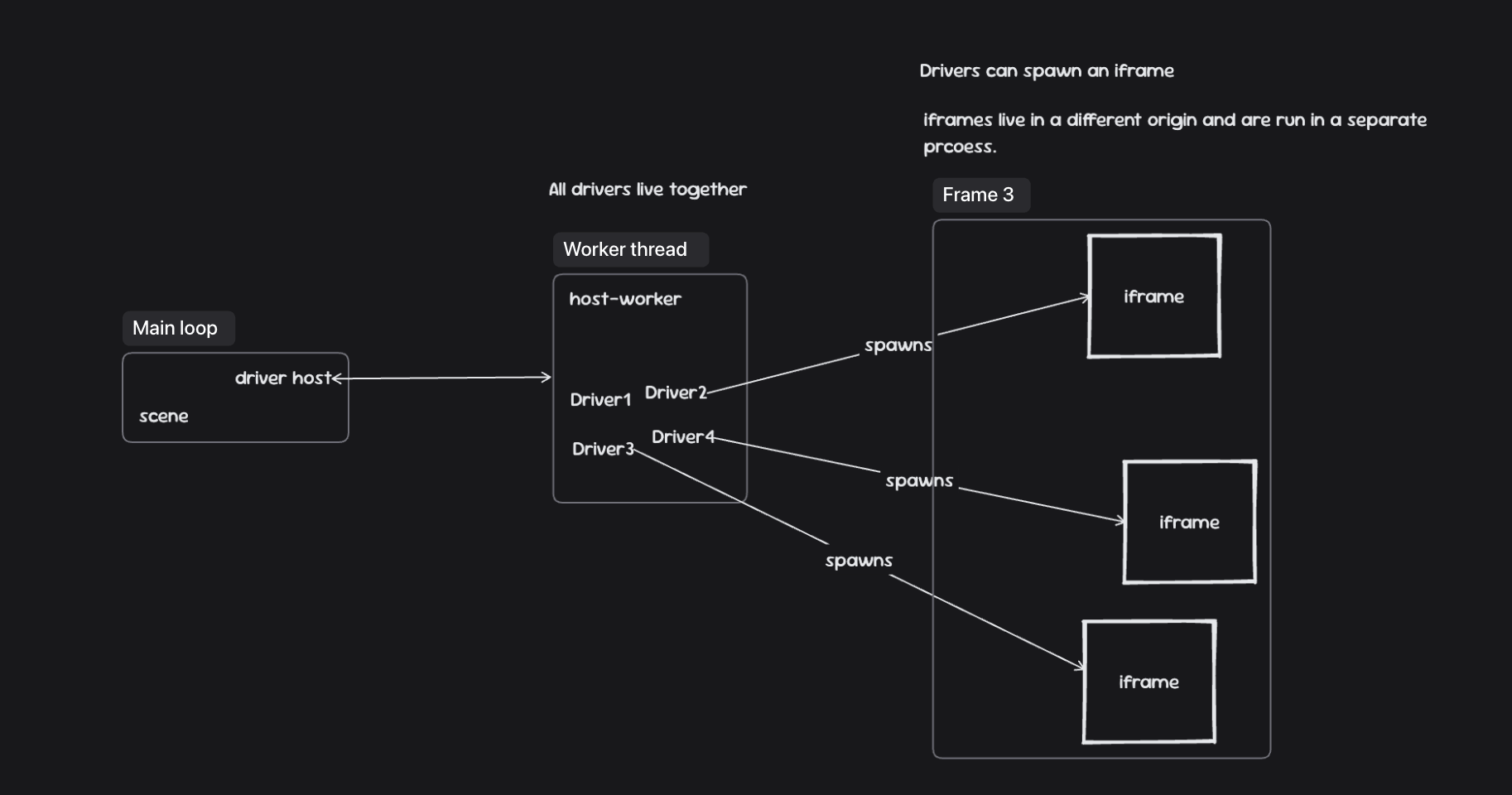
host-worker). Your activate and onEvent execute there. This is deliberate: a driver doing real work never blocks a frame, so the canvas stays smooth no matter what an extension is doing. The host and the worker talk only through the protocol envelope — the commands and subscriptions in this reference are the entire surface between them.
All drivers share that one worker. Driver1, Driver2, Driver3… sit side by side in the same context. When you need a hard boundary — third-party HTML, untrusted markup, a heavy embedded UI — spawn a webview. Webviews run in an iframe on a separate origin and their own process, so they get real origin and process isolation from your driver and from each other.
The trust model
Drivers are not sandboxed from one another inside the worker. They share a thread, so in principle one driver can observe or interfere with another. Every driver is reviewed before it can be published. But the best line of defence here is you. You install drivers the way you trust any extension — from a source that vouches for them. It’s a trust model, not a sandbox. The shared worker is what keeps drivers fast, lets them cooperate on the same scene, and keeps the protocol small. Reach for a webview whenever you want custom ui, or an isolation on top of that trust.The envelope
Every message — command or subscription — is aProtocolCommand:
typeidentifies the command, e.g."command:camera:get-info".driverIdis your extension’s id (from the manifest).requestIdis any value unique within your driver; it pairs a response to its request.reqcarries the request payload. Commands with no input omit it.resis the response: either{ value }or{ error }. On failureerroris a structuredProtocolCommandError
Errors
A failed command carries aProtocolCommandError in res.error — a discriminated type you can branch on, plus an optional human-readable message and a body with structured detail. The type values mirror familiar HTTP semantics:
error.type to react (e.g. degrade gracefully on "unauthorized", which means the command’s permission was not granted); read error.message for display and error.body for the specifics (not-found carries the missing id, for instance).
You never build the whole object with res yourself. You issue a request — the command minus res — and receive a response — the command minus req:
response.res:
The driver module
A driver exports aDriverModule:
activateruns once when Drawdy loads the driver. Use it to register menus, panels, and subscriptions, and to issue any startup commands.issueCommandsends a command and resolves to its typed response.manifestis the registered manifest.stylingis the current theme — seeModuleStyling.generateIdmints ids for canvas elements you create.
onEventreceives every subscription event your driver is registered for.
Manifest
main is the entry bundle filename inside the .drawdyx zip. permissions lists every permission the driver may need; commands that need an undeclared one fail with unauthorized.
In this section
- Permissions — what each permission grants, how to declare them, and when the user is asked.
- Commands — every command a driver can issue, with its request and response.
- Subscriptions — the events Drawdy pushes to
onEvent. - Webview API — the
acquireDrawdyApi()global inside a webview document. - Data Types — elements, schemas, styling, tool state, and CSS units.