A driver exports activate and onEvent. Here is a complete extension that adds a context-menu item, and each time it is clicked drops a sticky note on the canvas and flies the camera to it:
issueCommand is how you talk to Drawdy. Every call takes { type, driverId, requestId, req } and resolves to a response. driverId comes from your manifest; requestId is any value unique within your driver.
Subscriptions are set up by issuing a command.subscription:context-menu:clicked registers interest; the matching events then arrive in onEvent.
generateId mints ids for the canvas elements you create.
{ "driverId": "drawdy.my-extension", "driverName": "My Extension", "driverVersion": "1.0.0", "description": "A Drawdy extension.", "main": "main.js", "permissions": ["dom", "scene"]}
main is the entry bundle inside the .drawdyx zip. driverVersion is a semver version; every update you publish needs a higher one. driverId is the stable identity Drawdy uses for install, storage, and command routing. permissions declares what the driver may do; the starter adds a context menu (dom) and draws on the canvas (scene). Drawdy asks the user to grant each one the first time a command needs it. See Permissions.
The starter runs a Vite dev server (http://localhost:5173 by default — it prints the URL). On every save it rebuilds your extension, serves it at /built.drawdyx, and bumps a /version endpoint. Drawdy watches that endpoint and hot-reloads your driver on each build — no reinstall.
Development links work only on local boards, not cloud boards. Open or create a local workspace.
2
Add the dev server
Open the command palette with ⌘K (macOS) or Ctrl+K (Windows/Linux) and run Add extension dev server. Enter your dev server URL, e.g. http://localhost:5173 (a bare localhost:5173 works too).
3
Edit and save
Drawdy polls <your-url>/version every second, and when it changes it fetches <your-url>/built.drawdyx and reloads the driver in place.
Remove a link with Remove extension dev server in the same palette. Links are stored per board in your browser, so each board keeps its own set. ws:// and wss:// URLs are accepted and normalized to http/https; the path is ignored, so only the host matters.
A cloud board never shows these commands — the extension host would have to
trust an arbitrary local server, so hot reload is restricted to local boards
you own.
Nothing stops you running more than one at a time. Each dev link is an independent connection: Drawdy polls each one separately and installs the driver it serves under that driver’s own driverId, so all of them live on the same board side by side.To add a second extension:
1
Run its dev server on a different port
The starter pins port 5173 with strictPort, so a second npm run dev would fail on the same port. Start it on another port instead:
npm run dev -- --port 5174
(or change server.port in that extension’s vite.config.ts).
2
Add a second dev server
Run Add extension dev server again and enter the new URL, e.g. http://localhost:5174. The palette now lists a Remove extension dev server entry per link, so you can drop them one at a time.
Give each extension a distinct driverId in its manifest.json. Two dev
servers serving the same driverId install over each other — Drawdy routes
by driverId, so the id is what keeps them separate.
This produces dist/<driver-id>.drawdyx — the zip of your manifest.json and main.js. That single file is the whole extension. Anyone can install it into Drawdy.
manifest.json the DriverManifestmain.js a single CommonJS bundle exporting `activate` and `onEvent`
The bundle must be CommonJS with named exports — Drawdy loads it and reads its activate and onEvent exports. The starter’s Rollup config emits exactly this; if you roll your own build, target format: "cjs" with exports: "named".
You submit from a GitHub repository, not from the .drawdyx you built. Drawdy fetches your source from GitHub and builds it with its own build rules. Choose how you want to share it:
You, plus editors of the cloud boards you install it on
Review
Reviewed by the Drawdy team before it goes live
None. Ready as soon as the checks pass
GitHub sign-in
Required, to prove you can push to the repo
Not needed
Where it is built
On Drawdy’s servers, once per submitted commit
In your browser, when you install it
Updates
You submit each new version for review
Installed copies follow new commits on the branch
You can do both from the Account → Extensions page on drawdy.io, or through the API. If you don’t see that page, submitting isn’t enabled for your account yet.
These rules apply to public and private extensions alike. The repository must be public on GitHub.
manifest.json at the repository root. It must be valid JSON with these fields:
Field
Rule
driverId
Dot-namespaced lowercase, e.g. yourname.my-extension. At most 100 characters.
driverName
1 to 100 characters.
driverVersion
Semver major.minor.patch, e.g. 1.0.0.
description
1 to 500 characters. Shown on the listing.
main
A plain .js filename, e.g. main.js. The built bundle is written under this name.
permissions
The permissions the driver uses, from dom, scene, storage, collaboration.
icon
Optional. A relative path to a .png, .webp or .svg file in the repository.
Drawdy won’t install an extension whose manifest has no description or permissions. Use an empty array if the driver needs no permission. See Permissions.
An entry file at src/index.ts, src/index.tsx or src/index.js. Drawdy bundles it with esbuild into one CommonJS file targeting ES2020 in the browser.
No npm dependencies. Relative imports work, but the only package you may import is @drawdy/driver-protocol, which is types only. Drawdy does not run npm install, so any other package import fails the build. Copy the code you need into your repository instead.
No bundler plugins. Your Vite or Rollup config is not used. If the starter generates a module at build time (a virtual: import, such as webview HTML), commit the generated file as source, e.g. src/webview-html.ts, and import that.
Size limits. At most 500 files and 20 MB across the whole repository, not only src/. The built bundle must stay under 5 MB.
Optional listing files, all read from the same commit:
Icon: the icon path from the manifest, or else icon.png, icon.webp or icon.svg at the root. PNG, WebP or SVG, up to 256 KB. SVGs containing scripts are rejected.
README.md at the root, up to 200 KB. It becomes the extension’s overview page. Relative links and images are rewritten to point at your repository on GitHub.
CHANGELOG.md at the root, up to 200 KB. It appears in the Changelog tab.
Pick a driverId under your own name, e.g. yourname.my-extension. The
first person to submit an id owns it, and nobody else can publish under it
afterwards. drawdy. ids are for Drawdy’s own extensions.
Skip this if you use the page on drawdy.io. To submit with the API, from a script or an AI agent, you need a Drawdy token. You approve it once in the browser, so the agent never needs your password.Request a device code:
Until you approve, it answers with the error authorization_pending. Keep polling, and add 5 seconds to the interval on slow_down. After approval it returns { "access_token": "…", "token_type": "Bearer", "expires_in": 2592000 }. The token lasts 30 days. Send it on every API call in sections 7 and 8 as Authorization: Bearer <access_token>.The API is at https://api.drawdy.io. Every failed call returns { "error": "<message>" }, and the message says what to fix.
To let an AI agent do it, give it this page and a prompt such as: “Submit
the extension in this repository to Drawdy as a public extension, using the
API in the Drawdy quickstart. Push first, show me the approval link, then
report the submission status and any build error or reviewer note.” For a
private extension, ask it to add the repository as a private extension
instead. Approve the link it shows you.
A public extension is listed in the Marketplace, where anyone can install it. The Drawdy team reviews every version before it goes live. Your GitHub account must have push access to the repository. You can submit up to 10 times per day.
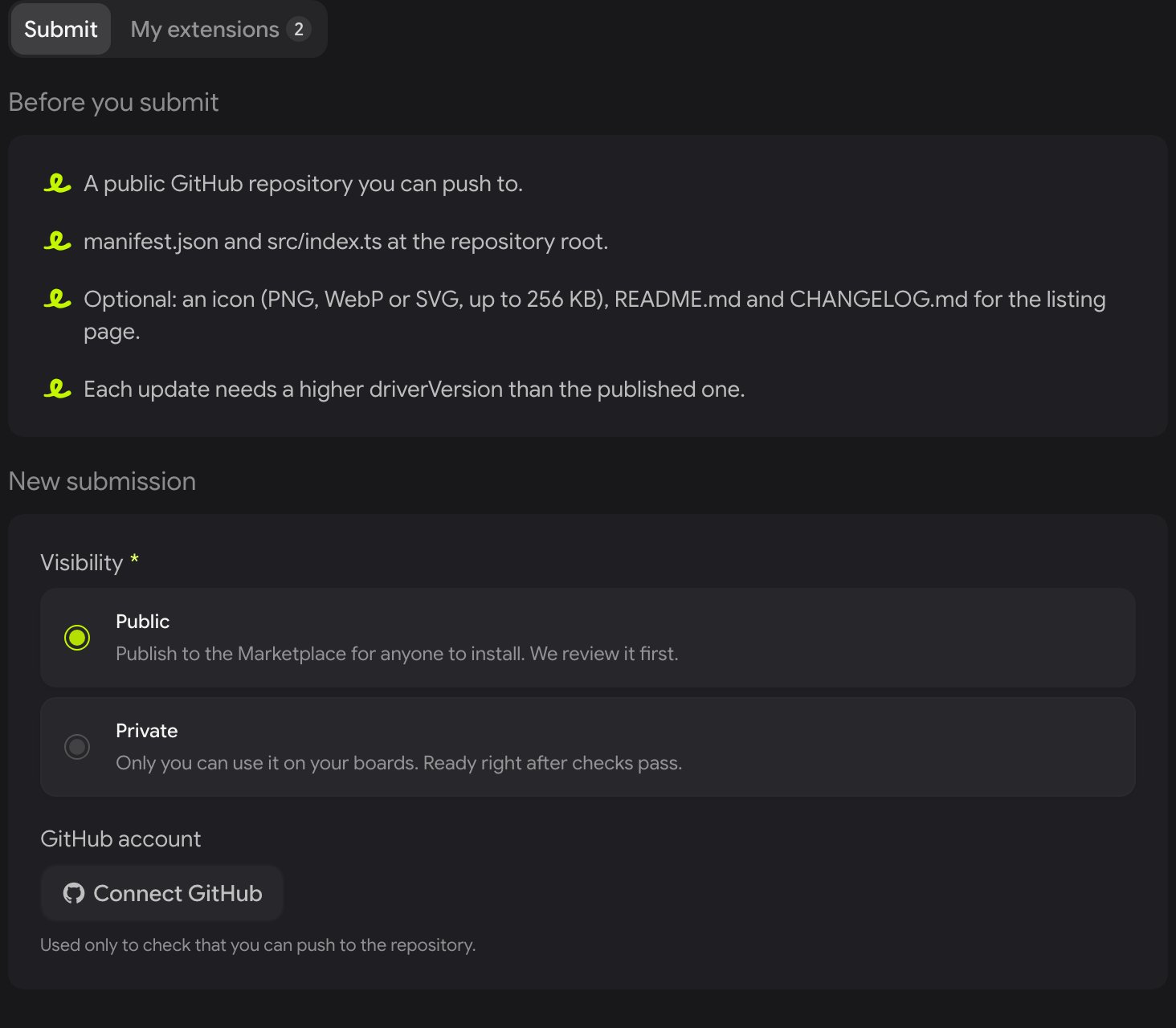
The Submit tab, with Public selected and GitHub not connected yet.
3
Connect GitHub
Click Connect GitHub and approve access. Drawdy uses this only to check that your GitHub account has push access to the repository. You can submit only repositories you can push to.
4
Enter the repository
Paste the repository URL, e.g. https://github.com/you/my-extension. Optionally enter a branch, tag or commit; leave it empty to submit the latest commit on the default branch.
5
Submit for review
Click Submit for review. Drawdy pins the submission to that exact commit, so pushing again later does not change what is reviewed.
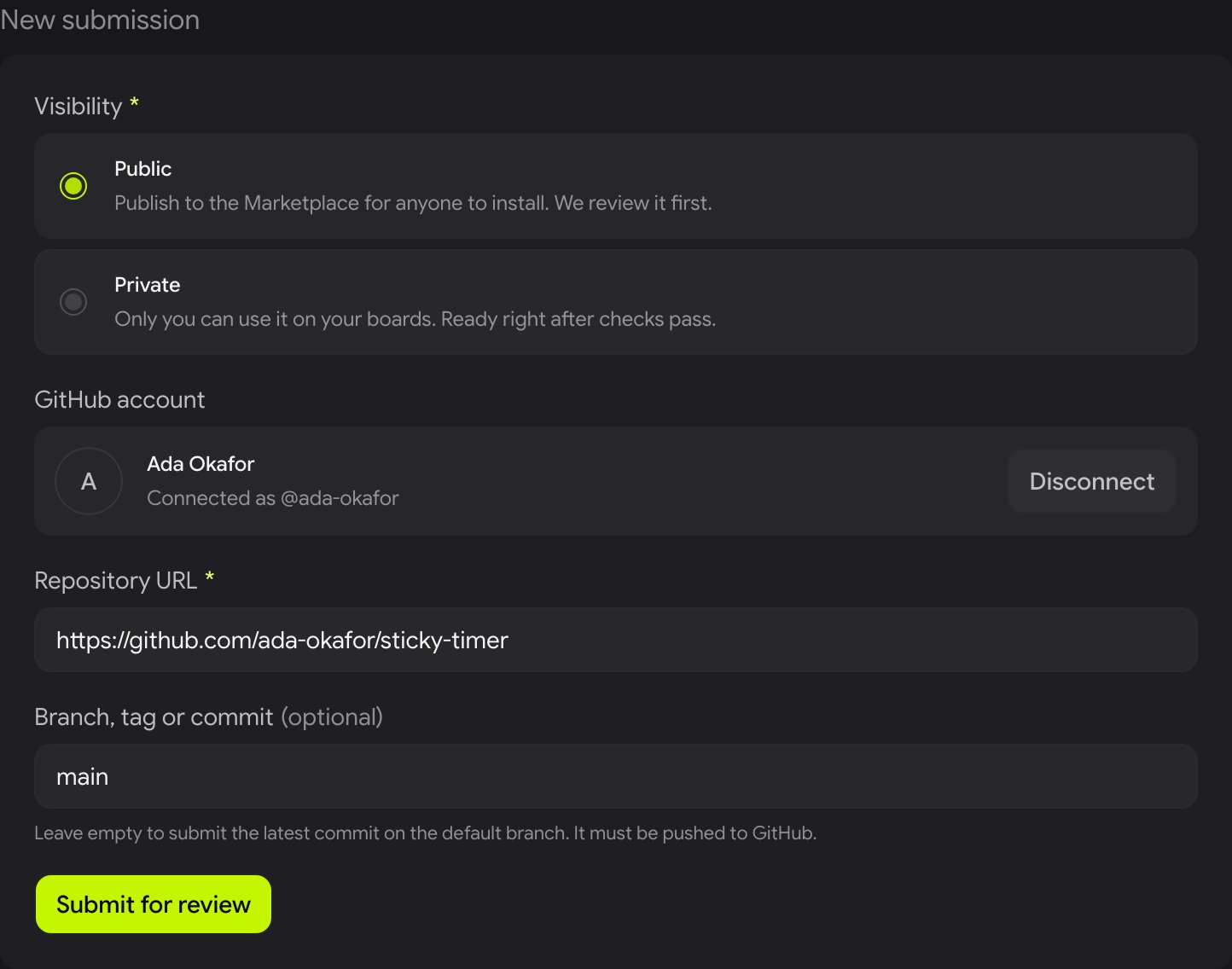
GitHub connected, repository and branch filled in, ready to submit.
Any GitHub token that can read the repository works, for example gh auth token, or a fine-grained personal access token limited to that repository. Drawdy uses it only to check that your GitHub account has push access to the repository, and does not store it.
This returns { "submissions": [...] }, newest first. Each one has a status (see the review process), plus buildError when the build failed and reviewNote once a reviewer has decided. GET /api/extensions/submissions lists your latest submissions across all extensions.
Status
When
400
The repository URL or ref is wrong, or manifest.json is missing or invalid. The message names the field.
401
The Drawdy token is missing or expired, or the GitHub token is invalid. Get a new one.
403
Your GitHub account can’t push to the repository, or the driverId belongs to another publisher.
409
driverVersion is not higher than the published version.
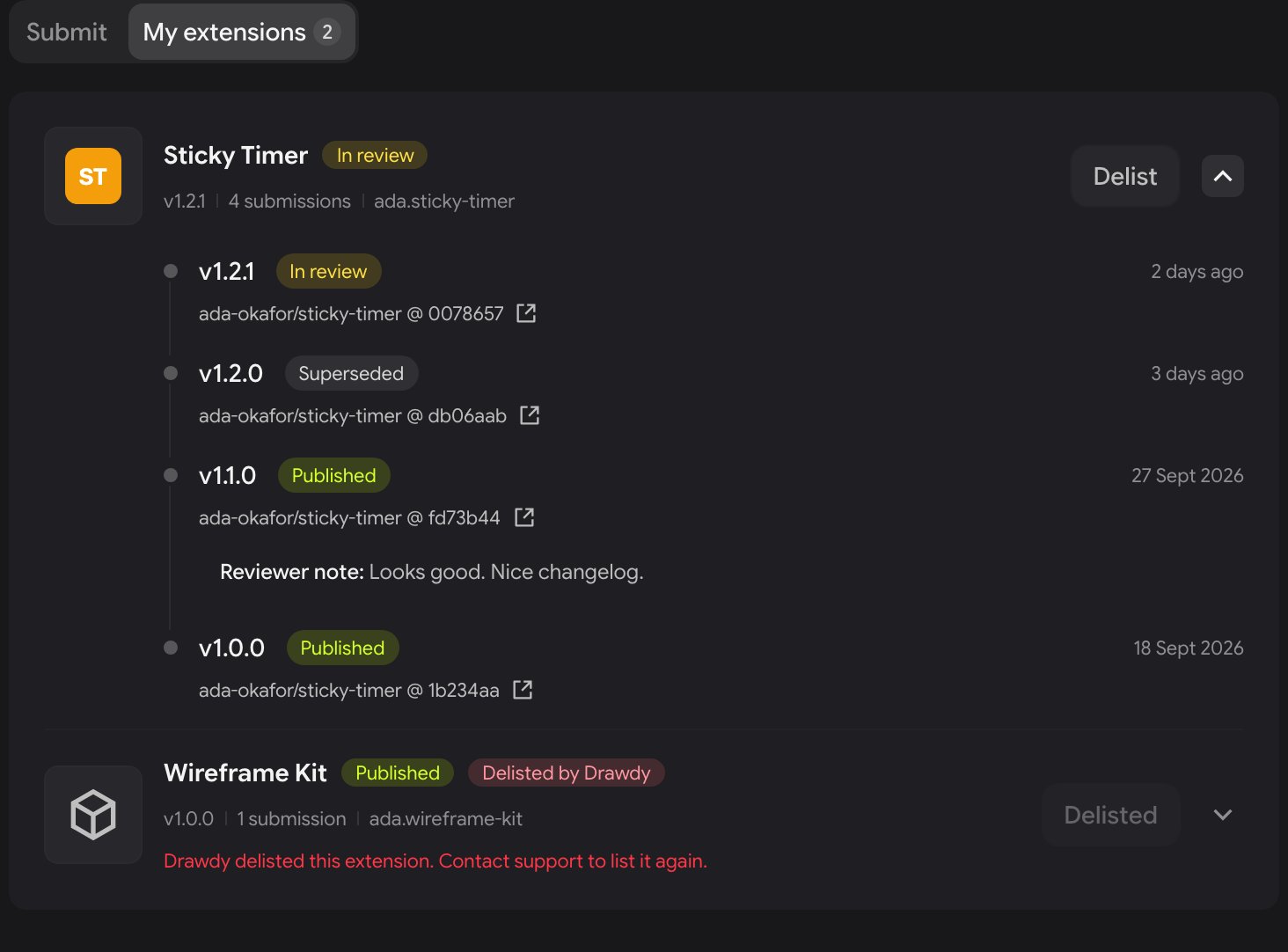
Every public submission goes through the same steps. You follow them in Account → Extensions → My extensions, where each extension expands into its submission history.
My extensions: Sticky Timer expanded, with v1.2.1 in review, v1.2.0 superseded and two published versions. Wireframe Kit was delisted by Drawdy.
1
Building
Drawdy checks the manifest, downloads your repository at the pinned commit and bundles it under the rules above.If the build fails, the status changes to Build failed and the Build error says why, for example a disallowed import or a missing entry file. Fix it, push, and submit again.
2
Scan
Drawdy scans the built bundle for calls that need a closer look. A match never fails the submission. It points the reviewer at that line.
3
In review
A member of the Drawdy team reviews the submission. They read:
the built bundle, line by line where the scan flagged something
the manifest, and whether each permission matches what the extension does
the listing: name, description, icon, README and changelog
the repository and commit it was built from
Keep the bundle readable: don’t commit minified or obfuscated source, and declare only the permissions the extension uses.
4
Decision
Approved → Published. Drawdy publishes the build straight to the Marketplace. The listing shows Live · v1.0.0, and that version is pinned to the reviewed commit.
Rejected. The Reviewer note says what to change. Fix it and submit again; a rejected version has not been published, so you can resubmit with the same driverVersion.
Status
API status
Meaning
Building
pending_build
Accepted and waiting for, or in, the build.
Build failed
build_failed
The build stopped. The build error says why.
In review
pending_review
Built and waiting for a reviewer.
Approved
approved
Approved, and being published to the Marketplace.
Published
published
Live in the Marketplace.
Rejected
rejected
Declined. The reviewer note says what to change.
Superseded
superseded
You submitted the same extension again before this one finished, so it was replaced.
Submitting again while an earlier submission is still building or in review replaces the earlier one, which becomes Superseded. Only the newest submission is reviewed.
Bump driverVersion in manifest.json above the published version, add an entry to CHANGELOG.md, push, and submit again. Every update goes through the full review. Until the new version is approved, the Marketplace keeps serving the current one.
Delist an extension from My extensions to remove it from the Marketplace, so nobody new can install it. List again puts it back.
Users can report an extension from its Marketplace page. Drawdy reviews reports and can delist an extension. An extension delisted by Drawdy shows Delisted by Drawdy and can only be listed again by Drawdy; contact support if you think it was a mistake.
Drawdy can mark a publisher as verified. Verified publishers get a badge next to their name on every listing.
A private extension skips the Marketplace and the review. Use it for extensions you only want on your own boards, or to try one out before submitting it publicly. No GitHub sign-in is needed, and Drawdy stores only the repository URL.
The repository must be public on GitHub and follow the same rules as a public extension.
2
Add it to your account
Go to Account → Extensions, open the Submit tab, choose Private, paste the repository URL and click Add extension. No GitHub sign-in is needed.Drawdy checks that manifest.json is at the root with a description and permissions, and that an entry file exists. It stores only the repository URL.
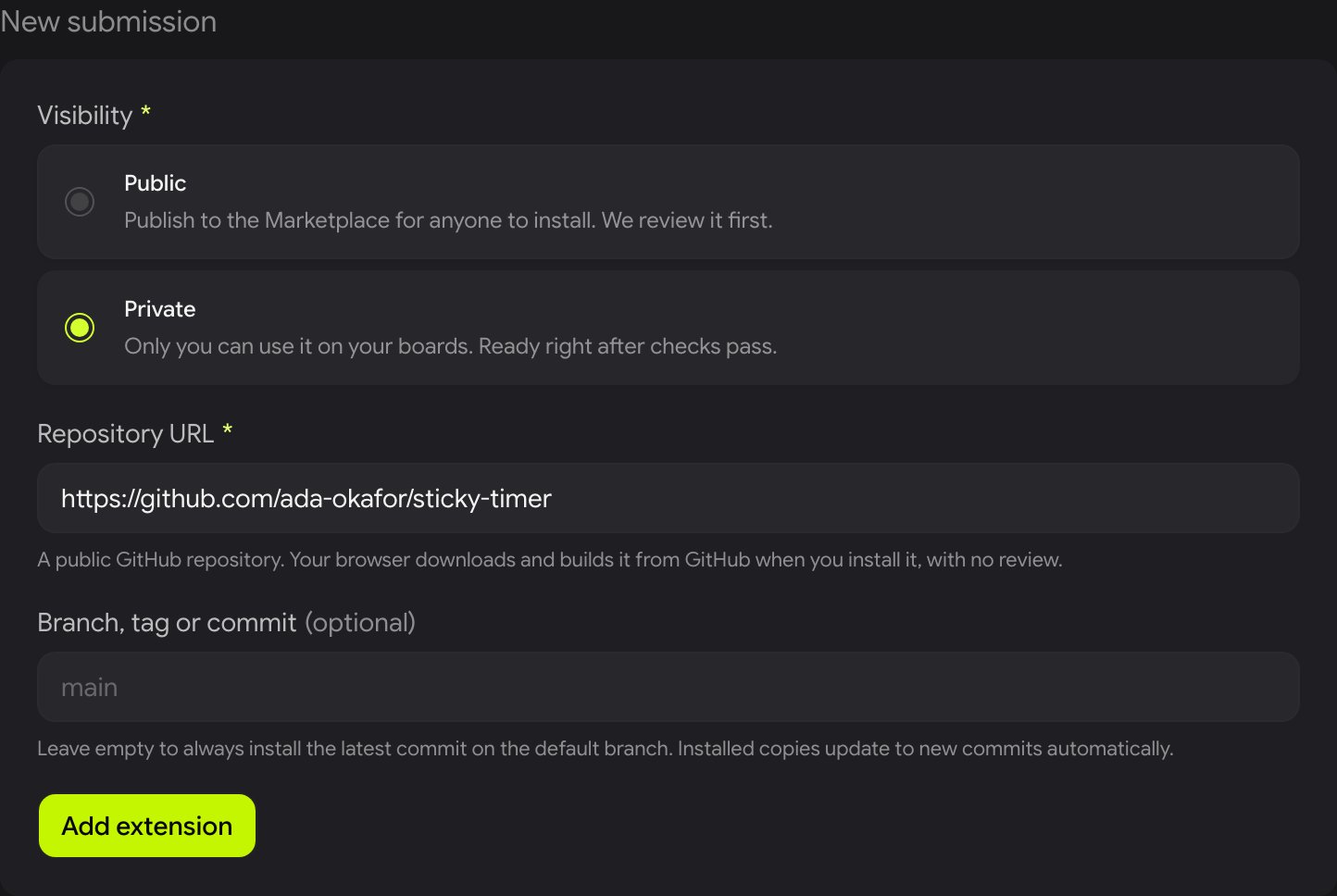
Private needs no GitHub sign-in, only the repository URL.
3
Install it on a board
On any of your boards, open Extensions → Private and install it. Your browser downloads the source from GitHub and builds it with the same rules Drawdy’s servers use, then caches the build.
Add "ref" to choose a branch, tag or commit (see which code is installed). Drawdy checks that manifest.json is at the root with a description and permissions, and that an entry file exists. A 201 returns { "extension": {...} } with its id, driverId, name and version. Then install it on a board from Extensions → Private.GET /api/extensions/private lists the private extensions on your account, and DELETE /api/extensions/private/<id> removes one.
Status
When
400
The repository isn’t a public GitHub URL, or manifest.json or the entry file is missing or invalid.
401
The Drawdy token is missing or expired. Get a new one.
409
You already added this repository.
429
You already have 50 private extensions, or you added more than 10 in a minute.
The optional Branch, tag or commit (ref) decides which code is installed:
Empty or a branch: installs the latest commit on that branch. Installed copies check for new commits at most every 6 hours and update to them, without a review.
A tag or commit SHA: stays on that code until you change it.
Sharing. When you install a private extension on a cloud board you can edit, editors of that board get it too. Drawdy tells them it is a private extension from you and that it has not been reviewed. Viewers don’t get it.
Removing it. Removing it from your account stops new installs. Boards where it’s already installed keep their copy until it’s uninstalled there.
Limits. Up to 50 private extensions per account.
GitHub rate limits. Each install or update check calls the GitHub API without signing in, which GitHub limits to 60 requests per hour per network. If you reach it, Drawdy waits and tries again later.
The protocol repo ships three runnable drivers, drawdy-hello, drawdy-math-symbols, and drawdy-physics-engine, each built with this same template. See Examples for what each one shows, or browse examples/ on GitHub.
{"docsConfig":{"theme":"mint","$schema":"https://mintlify.com/docs.json","name":"Drawdy Driver Protocol","description":"The Drawdy Driver Protocol (DDP) is the open API for building Drawdy extensions: JavaScript drivers that draw on the canvas and add menus and panels.","colors":{"primary":"#597100","light":"#bceb00","dark":"#597100"},"logo":{"light":"https://mintcdn.com/drawdy-driver-protocol/SC6J2wYsaBeSMltn/logo/light.svg?fit=max\u0026auto=format\u0026n=SC6J2wYsaBeSMltn\u0026q=85\u0026s=69602d9eef7b41be52eff1ddb5b88c78","dark":"https://mintcdn.com/drawdy-driver-protocol/SC6J2wYsaBeSMltn/logo/dark.svg?fit=max\u0026auto=format\u0026n=SC6J2wYsaBeSMltn\u0026q=85\u0026s=b4e543b62b9dc95af780f4f782c7c882"},"favicon":"https://mintcdn.com/drawdy-driver-protocol/SC6J2wYsaBeSMltn/favicon.svg?fit=max\u0026auto=format\u0026n=SC6J2wYsaBeSMltn\u0026q=85\u0026s=cdb989cddd947f76d81c8be0ede35bee","appearance":{"default":"dark"},"background":{"color":{"light":"#ffffff","dark":"#18181b"}},"navbar":{"links":[{"href":"https://drawdy.io/extensions","label":"Extension marketplace"},{"href":"https://github.com/drawdyio/drawdy-driver-protocol","label":"GitHub"}],"primary":{"type":"button","label":"Open Drawdy","href":"https://drawdy.io"}},"footer":{"socials":{"website":"https://drawdy.io","github":"https://github.com/drawdyio/drawdy-driver-protocol"}},"seo":{"organization":{"id":"https://drawdy.io/#organization","name":"Drawdy","url":"https://drawdy.io","logo":"https://drawdy.io/landing/logo.webp","sameAs":["https://github.com/drawdyio"]},"indexing":"all"},"fonts":{"heading":{"family":"Google Sans Flex","weight":600},"body":{"family":"Google Sans Flex","weight":400}},"styling":{"codeblocks":"system","latex":false},"contextual":{"options":["copy","view","chatgpt","claude","perplexity","mcp","cursor","vscode"],"display":"header"},"thumbnails":{"fonts":{"family":"Google Sans Flex"}},"navigation":{"pages":[]}},"deployment":{"deploymentMetadataValue":{"subdomain":"drawdy-driver-protocol","hasAudioNarration":false,"actualSubdomain":"drawdy-driver-protocol","customDomains":["ddp.drawdy.io"],"gitSource":{"type":"github","owner":"drawdyio","repo":"drawdy-driver-protocol","deployBranch":"main","contentDirectory":"docs","isPrivate":true,"mountPath":"","label":""},"chroma":{"latestBuiltDeploymentHistoryId":"6ad278fc594a18cf9a95a075","collectionId":"069b8c4f-b441-41ae-89f8-5480e2e4d708","liveDeploymentHistoryId":"6ad278fc594a18cf9a95a075","schemaVersion":"v3"},"entitlements":{},"buildId":"6ad278fc594a18cf9a95a075","clientVersion":"0.0.3926","searchFilterCounts":[{"language":"default","tag":"Protocol reference","count":6},{"language":"default","tag":"Guide","count":3}]},"assistantConfig":{"enableAskAiButton":false,"enableStarterQuestions":false,"enableContextualStarterQuestions":false,"enableAskAiSearchBar":true},"hasChatPermissions":false,"hasWebMcpPermissions":false,"toggles":[{"name":"kill-isr","enabled":true,"variant":{"name":"disabled","enabled":false,"feature_enabled":true},"impressionData":false},{"name":"agent-mintlify-slack","enabled":true,"variant":{"name":"disabled","enabled":false,"feature_enabled":true},"impressionData":false},{"name":"editor-v7-file-tree","enabled":true,"variant":{"name":"disabled","enabled":false,"feature_enabled":true},"impressionData":false},{"name":"agent-integrations-settings","enabled":true,"variant":{"name":"disabled","enabled":false,"feature_enabled":true},"impressionData":false},{"name":"automations-pr-grouping","enabled":true,"variant":{"name":"disabled","enabled":false,"feature_enabled":true},"impressionData":false},{"name":"custom-prefix","enabled":true,"variant":{"name":"disabled","enabled":false,"feature_enabled":true},"impressionData":false},{"name":"analytics-v7","enabled":true,"variant":{"name":"disabled","enabled":false,"feature_enabled":true},"impressionData":false},{"name":"user-flows-analytics","enabled":true,"variant":{"name":"disabled","enabled":false,"feature_enabled":true},"impressionData":false},{"name":"no-publish-flow","enabled":true,"variant":{"name":"disabled","enabled":false,"feature_enabled":true},"impressionData":false},{"name":"workos-onboarding","enabled":true,"variant":{"name":"disabled","enabled":false,"feature_enabled":true},"impressionData":false},{"name":"llms-txt-v2","enabled":true,"variant":{"name":"disabled","enabled":false,"feature_enabled":true},"impressionData":false},{"name":"pause-universal-search-reconcile","enabled":true,"variant":{"name":"disabled","enabled":false,"feature_enabled":true},"impressionData":false},{"name":"snapshot-serving-live","enabled":true,"variant":{"name":"disabled","enabled":false,"feature_enabled":true},"impressionData":false},{"name":"stripTemperatureMiddleware","enabled":true,"variant":{"name":"disabled","enabled":false,"feature_enabled":true},"impressionData":false},{"name":"per-site-search-delta","enabled":true,"variant":{"name":"disabled","enabled":false,"feature_enabled":true},"impressionData":false},{"name":"support-platform-pylon-zendesk","enabled":true,"variant":{"name":"disabled","enabled":false,"feature_enabled":true},"impressionData":false},{"name":"snapshot-serving","enabled":true,"variant":{"name":"disabled","enabled":false,"feature_enabled":true},"impressionData":false},{"name":"instant-rollback","enabled":true,"variant":{"name":"disabled","enabled":false,"feature_enabled":true},"impressionData":false},{"name":"granular-notifications-server","enabled":true,"variant":{"name":"disabled","enabled":false,"feature_enabled":true},"impressionData":false},{"name":"granular-notifications","enabled":true,"variant":{"name":"disabled","enabled":false,"feature_enabled":true},"impressionData":false},{"name":"editor-private-page-search","enabled":true,"variant":{"name":"disabled","enabled":false,"feature_enabled":true},"impressionData":false},{"name":"automations-fable","enabled":true,"variant":{"name":"disabled","enabled":false,"feature_enabled":true},"impressionData":false},{"name":"fixed-ai-action-pricing","enabled":true,"variant":{"name":"disabled","enabled":false,"feature_enabled":true},"impressionData":false},{"name":"automation-resolve-merge-conflict","enabled":true,"variant":{"name":"disabled","enabled":false,"feature_enabled":true},"impressionData":false},{"name":"scoped-publishing","enabled":true,"variant":{"name":"disabled","enabled":false,"feature_enabled":true},"impressionData":false},{"name":"mintql","enabled":true,"variant":{"name":"disabled","enabled":false,"feature_enabled":true},"impressionData":false},{"name":"page-level-analytics","enabled":true,"variant":{"name":"disabled","enabled":false,"feature_enabled":true},"impressionData":false},{"name":"editor-version-history-v2","enabled":true,"variant":{"name":"disabled","enabled":false,"feature_enabled":true},"impressionData":false},{"name":"editor-nav-generations","enabled":true,"variant":{"name":"disabled","enabled":false,"feature_enabled":true},"impressionData":false},{"name":"billing-page-v2","enabled":true,"variant":{"name":"disabled","enabled":false,"feature_enabled":true},"impressionData":false},{"name":"vite-origin","enabled":true,"variant":{"name":"disabled","enabled":false,"feature_enabled":true},"impressionData":false},{"name":"workspace-projects","enabled":true,"variant":{"name":"disabled","enabled":false,"feature_enabled":true},"impressionData":false},{"name":"assistant-v5","enabled":true,"variant":{"name":"disabled","enabled":false,"feature_enabled":true},"impressionData":false},{"name":"byok-sep-25","enabled":true,"variant":{"name":"disabled","enabled":false,"feature_enabled":true},"impressionData":false},{"name":"fork-pr-previews","enabled":true,"variant":{"name":"disabled","enabled":false,"feature_enabled":true},"impressionData":false},{"name":"revalidation-jwt","enabled":true,"variant":{"name":"disabled","enabled":false,"feature_enabled":true},"impressionData":false},{"name":"editor-agent-model-picker","enabled":true,"variant":{"name":"disabled","enabled":false,"feature_enabled":true},"impressionData":false},{"name":"hobby-abuse-scan","enabled":true,"variant":{"name":"disabled","enabled":false,"feature_enabled":true},"impressionData":false},{"name":"dashboard-inbox","enabled":true,"variant":{"name":"disabled","enabled":false,"feature_enabled":true},"impressionData":false}],"isAtlas":false,"googleFontsInlined":true},"customCss":[{"filePath":"theme.css","content":"/* latin-ext */\n@font-face {\n font-family: 'DM Mono';\n font-style: normal;\n font-weight: 400;\n font-display: swap;\n src: url(/_mintlify/assets/fonts/google/s/dmmono/v16/aFTU7PB1QTsUX8KYthSQBLyM.woff2) format('woff2');\n unicode-range: U+0100-02BA, U+02BD-02C5, U+02C7-02CC, U+02CE-02D7, U+02DD-02FF, U+0304, U+0308, U+0329, U+1D00-1DBF, U+1E00-1E9F, U+1EF2-1EFF, U+2020, U+20A0-20AB, U+20AD-20C4, U+2113, U+2C60-2C7F, U+A720-A7FF;\n}\n/* latin */\n@font-face {\n font-family: 'DM Mono';\n font-style: normal;\n font-weight: 400;\n font-display: swap;\n src: url(/_mintlify/assets/fonts/google/s/dmmono/v16/aFTU7PB1QTsUX8KYthqQBA.woff2) format('woff2');\n unicode-range: U+0000-00FF, U+0131, U+0152-0153, U+02BB-02BC, U+02C6, U+02DA, U+02DC, U+0304, U+0308, U+0329, U+2000-206F, U+20AC, U+2122, U+2191, U+2193, U+2212, U+2215, U+FEFF, U+FFFD;\n}\n/* latin-ext */\n@font-face {\n font-family: 'DM Mono';\n font-style: normal;\n font-weight: 500;\n font-display: swap;\n src: url(/_mintlify/assets/fonts/google/s/dmmono/v16/aFTR7PB1QTsUX8KYvumzEY2tbZX9.woff2) format('woff2');\n unicode-range: U+0100-02BA, U+02BD-02C5, U+02C7-02CC, U+02CE-02D7, U+02DD-02FF, U+0304, U+0308, U+0329, U+1D00-1DBF, U+1E00-1E9F, U+1EF2-1EFF, U+2020, U+20A0-20AB, U+20AD-20C4, U+2113, U+2C60-2C7F, U+A720-A7FF;\n}\n/* latin */\n@font-face {\n font-family: 'DM Mono';\n font-style: normal;\n font-weight: 500;\n font-display: swap;\n src: url(/_mintlify/assets/fonts/google/s/dmmono/v16/aFTR7PB1QTsUX8KYvumzEYOtbQ.woff2) format('woff2');\n unicode-range: U+0000-00FF, U+0131, U+0152-0153, U+02BB-02BC, U+02C6, U+02DA, U+02DC, U+0304, U+0308, U+0329, U+2000-206F, U+20AC, U+2122, U+2191, U+2193, U+2212, U+2215, U+FEFF, U+FFFD;\n}\nhtml:root{--gray-50:250 250 250;--gray-100:244 244 245;--gray-200:228 228 231;--gray-300:212 212 216;--gray-400:161 161 170;--gray-500:113 113 122;--gray-600:82 82 91;--gray-700:63 63 70;--gray-800:39 39 42;--gray-900:24 24 27;--gray-950:9 9 11;--font-paper-mono:\"DM Mono\", ui-monospace, SFMono-Regular, Menlo, Consolas, monospace;--font-family-mono-custom:var(--font-paper-mono)}"}],"page":{"pagePath":"quickstart","slug":"/quickstart","pageMetadata":{"title":"Build your first extension","sidebarTitle":"Quickstart","description":"Build your first Drawdy extension from the starter, run it in development mode, package it, and submit it as a public or private extension.","href":"/quickstart"},"description":{"compiledSource":"\"use strict\";\nconst {jsx: _jsx} = arguments[0];\nconst {useMDXComponents: _provideComponents} = arguments[0];\nfunction _createMdxContent(props) {\n const _components = {\n p: \"p\",\n ..._provideComponents(),\n ...props.components\n };\n return _jsx(_components.p, {\n children: \"Build your first Drawdy extension from the starter, run it in development mode, package it, and submit it as a public or private extension.\"\n });\n}\nfunction MDXContent(props = {}) {\n const {wrapper: MDXLayout} = {\n ..._provideComponents(),\n ...props.components\n };\n return MDXLayout ? _jsx(MDXLayout, {\n ...props,\n children: _jsx(_createMdxContent, {\n ...props\n })\n }) : _createMdxContent(props);\n}\nreturn {\n default: MDXContent\n};\n","frontmatter":{},"scope":{}},"pageType":"default","mdx":{"mdxSource":{"compiledSource":"\"use strict\";const{Fragment:_Fragment,jsx:_jsx,jsxs:_jsxs}=arguments[0];const{useMDXComponents:_provideComponents}=arguments[0];function _createMdxContent(props){const _components={a:`a`,code:`code`,em:`em`,li:`li`,p:`p`,pre:`pre`,span:`span`,strong:`strong`,tbody:`tbody`,td:`td`,th:`th`,thead:`thead`,tr:`tr`,ul:`ul`,..._provideComponents(),...props.components},{CodeBlock,Frame,Heading,Note,OptimizedImage,Step,Steps,Table,Tip}=_components;if(!CodeBlock)_missingMdxReference(`CodeBlock`,true);if(!Frame)_missingMdxReference(`Frame`,true);if(!Heading)_missingMdxReference(`Heading`,true);if(!Note)_missingMdxReference(`Note`,true);if(!OptimizedImage)_missingMdxReference(`OptimizedImage`,true);if(!Step)_missingMdxReference(`Step`,true);if(!Steps)_missingMdxReference(`Steps`,true);if(!Table)_missingMdxReference(`Table`,true);if(!Tip)_missingMdxReference(`Tip`,true);return _jsxs(_Fragment,{children:[_jsx(_components.p,{children:`This walks through building a driver from the starter template, running it against Drawdy in development, and packaging it for distribution.`}),`\n`,_jsx(Heading,{level:`2`,id:`1-get-the-starter`,children:`1. Get the starter`}),`\n`,_jsxs(_components.p,{children:[`The fastest path is to clone the `,_jsx(_components.strong,{children:`extension starter`}),`, a Vite project wired for the whole build:`]}),`\n`,_jsx(CodeBlock,{filename:``,numberOfLines:`3`,language:`shellscript`,children:_jsx(_components.pre,{className:`shiki shiki-themes github-light-default dark-plus`,style:{backgroundColor:`#ffffff`,\"--shiki-dark-bg\":`#0B0C0E`,color:`#1f2328`,\"--shiki-dark\":`#D4D4D4`},language:`shellscript`,children:_jsxs(_components.code,{language:`shellscript`,numberOfLines:`3`,children:[_jsxs(_components.span,{className:`line`,children:[_jsx(_components.span,{style:{color:`#953800`,\"--shiki-dark\":`#DCDCAA`},children:`git`}),_jsx(_components.span,{style:{color:`#0A3069`,\"--shiki-dark\":`#CE9178`},children:` clone`}),_jsx(_components.span,{style:{color:`#0A3069`,\"--shiki-dark\":`#CE9178`},children:` https://github.com/drawdyio/drawdy-extension-starter`}),_jsx(_components.span,{style:{color:`#0A3069`,\"--shiki-dark\":`#CE9178`},children:` my-extension`})]}),`\n`,_jsxs(_components.span,{className:`line`,children:[_jsx(_components.span,{style:{color:`#0550AE`,\"--shiki-dark\":`#DCDCAA`},children:`cd`}),_jsx(_components.span,{style:{color:`#0A3069`,\"--shiki-dark\":`#CE9178`},children:` my-extension`})]}),`\n`,_jsxs(_components.span,{className:`line`,children:[_jsx(_components.span,{style:{color:`#953800`,\"--shiki-dark\":`#DCDCAA`},children:`npm`}),_jsx(_components.span,{style:{color:`#0A3069`,\"--shiki-dark\":`#CE9178`},children:` install`})]}),`\n`]})})}),`\n`,_jsx(_components.p,{children:`The starter already depends on the protocol package for its types:`}),`\n`,_jsx(CodeBlock,{filename:``,numberOfLines:`1`,language:`shellscript`,children:_jsx(_components.pre,{className:`shiki shiki-themes github-light-default dark-plus`,style:{backgroundColor:`#ffffff`,\"--shiki-dark-bg\":`#0B0C0E`,color:`#1f2328`,\"--shiki-dark\":`#D4D4D4`},language:`shellscript`,children:_jsxs(_components.code,{language:`shellscript`,numberOfLines:`1`,children:[_jsxs(_components.span,{className:`line`,children:[_jsx(_components.span,{style:{color:`#953800`,\"--shiki-dark\":`#DCDCAA`},children:`npm`}),_jsx(_components.span,{style:{color:`#0A3069`,\"--shiki-dark\":`#CE9178`},children:` install`}),_jsx(_components.span,{style:{color:`#0550AE`,\"--shiki-dark\":`#569CD6`},children:` --save-dev`}),_jsx(_components.span,{style:{color:`#0A3069`,\"--shiki-dark\":`#CE9178`},children:` @drawdy/driver-protocol`})]}),`\n`]})})}),`\n`,_jsxs(_components.p,{children:[`The protocol package is `,_jsx(_components.strong,{children:`types only`}),` — it ships no runtime code. You import types from it and nothing lands in your bundle.`]}),`\n`,_jsx(Heading,{level:`2`,id:`2-write-the-module`,children:`2. Write the module`}),`\n`,_jsxs(_components.p,{children:[`A driver exports `,_jsx(_components.code,{children:`activate`}),` and `,_jsx(_components.code,{children:`onEvent`}),`. Here is a complete extension that adds a context-menu item, and each time it is clicked drops a sticky note on the canvas and flies the camera to it:`]}),`\n`,_jsx(CodeBlock,{filename:``,numberOfLines:`72`,language:`typescript`,children:_jsx(_components.pre,{className:`shiki shiki-themes github-light-default dark-plus`,style:{backgroundColor:`#ffffff`,\"--shiki-dark-bg\":`#0B0C0E`,color:`#1f2328`,\"--shiki-dark\":`#D4D4D4`},language:`typescript`,children:_jsxs(_components.code,{language:`typescript`,numberOfLines:`72`,children:[_jsxs(_components.span,{className:`line`,children:[_jsx(_components.span,{style:{color:`#CF222E`,\"--shiki-dark\":`#C586C0`},children:`import`}),_jsx(_components.span,{style:{color:`#CF222E`,\"--shiki-dark\":`#C586C0`},children:` type`}),_jsx(_components.span,{style:{color:`#1F2328`,\"--shiki-dark\":`#D4D4D4`},children:` {`})]}),`\n`,_jsxs(_components.span,{className:`line`,children:[_jsx(_components.span,{style:{color:`#1F2328`,\"--shiki-dark\":`#9CDCFE`},children:` DriverCommandIssuer`}),_jsx(_components.span,{style:{color:`#1F2328`,\"--shiki-dark\":`#D4D4D4`},children:`,`})]}),`\n`,_jsxs(_components.span,{className:`line`,children:[_jsx(_components.span,{style:{color:`#1F2328`,\"--shiki-dark\":`#9CDCFE`},children:` DriverModule`}),_jsx(_components.span,{style:{color:`#1F2328`,\"--shiki-dark\":`#D4D4D4`},children:`,`})]}),`\n`,_jsxs(_components.span,{className:`line`,children:[_jsx(_components.span,{style:{color:`#1F2328`,\"--shiki-dark\":`#D4D4D4`},children:`} `}),_jsx(_components.span,{style:{color:`#CF222E`,\"--shiki-dark\":`#C586C0`},children:`from`}),_jsx(_components.span,{style:{color:`#0A3069`,\"--shiki-dark\":`#CE9178`},children:` \"@drawdy/driver-protocol\"`}),_jsx(_components.span,{style:{color:`#1F2328`,\"--shiki-dark\":`#D4D4D4`},children:`;`})]}),`\n`,_jsx(_components.span,{className:`line`}),`\n`,_jsxs(_components.span,{className:`line`,children:[_jsx(_components.span,{style:{color:`#CF222E`,\"--shiki-dark\":`#569CD6`},children:`const`}),_jsx(_components.span,{style:{color:`#0550AE`,\"--shiki-dark\":`#4FC1FF`},children:` MENU_ID`}),_jsx(_components.span,{style:{color:`#CF222E`,\"--shiki-dark\":`#D4D4D4`},children:` =`}),_jsx(_components.span,{style:{color:`#0A3069`,\"--shiki-dark\":`#CE9178`},children:` \"starter:add-note\"`}),_jsx(_components.span,{style:{color:`#1F2328`,\"--shiki-dark\":`#D4D4D4`},children:`;`})]}),`\n`,_jsx(_components.span,{className:`line`}),`\n`,_jsxs(_components.span,{className:`line`,children:[_jsx(_components.span,{style:{color:`#CF222E`,\"--shiki-dark\":`#569CD6`},children:`let`}),_jsx(_components.span,{style:{color:`#1F2328`,\"--shiki-dark\":`#9CDCFE`},children:` issue`}),_jsx(_components.span,{style:{color:`#CF222E`,\"--shiki-dark\":`#D4D4D4`},children:`:`}),_jsx(_components.span,{style:{color:`#953800`,\"--shiki-dark\":`#4EC9B0`},children:` DriverCommandIssuer`}),_jsx(_components.span,{style:{color:`#1F2328`,\"--shiki-dark\":`#D4D4D4`},children:`;`})]}),`\n`,_jsxs(_components.span,{className:`line`,children:[_jsx(_components.span,{style:{color:`#CF222E`,\"--shiki-dark\":`#569CD6`},children:`let`}),_jsx(_components.span,{style:{color:`#8250DF`,\"--shiki-dark\":`#DCDCAA`},children:` generateId`}),_jsx(_components.span,{style:{color:`#CF222E`,\"--shiki-dark\":`#D4D4D4`},children:`:`}),_jsx(_components.span,{style:{color:`#1F2328`,\"--shiki-dark\":`#D4D4D4`},children:` () `}),_jsx(_components.span,{style:{color:`#CF222E`,\"--shiki-dark\":`#569CD6`},children:`=>`}),_jsx(_components.span,{style:{color:`#0550AE`,\"--shiki-dark\":`#4EC9B0`},children:` string`}),_jsx(_components.span,{style:{color:`#1F2328`,\"--shiki-dark\":`#D4D4D4`},children:`;`})]}),`\n`,_jsxs(_components.span,{className:`line`,children:[_jsx(_components.span,{style:{color:`#CF222E`,\"--shiki-dark\":`#569CD6`},children:`let`}),_jsx(_components.span,{style:{color:`#1F2328`,\"--shiki-dark\":`#9CDCFE`},children:` driverId`}),_jsx(_components.span,{style:{color:`#CF222E`,\"--shiki-dark\":`#D4D4D4`},children:`:`}),_jsx(_components.span,{style:{color:`#0550AE`,\"--shiki-dark\":`#4EC9B0`},children:` string`}),_jsx(_components.span,{style:{color:`#1F2328`,\"--shiki-dark\":`#D4D4D4`},children:`;`})]}),`\n`,_jsxs(_components.span,{className:`line`,children:[_jsx(_components.span,{style:{color:`#CF222E`,\"--shiki-dark\":`#569CD6`},children:`let`}),_jsx(_components.span,{style:{color:`#1F2328`,\"--shiki-dark\":`#9CDCFE`},children:` requestSeq`}),_jsx(_components.span,{style:{color:`#CF222E`,\"--shiki-dark\":`#D4D4D4`},children:` =`}),_jsx(_components.span,{style:{color:`#0550AE`,\"--shiki-dark\":`#B5CEA8`},children:` 0`}),_jsx(_components.span,{style:{color:`#1F2328`,\"--shiki-dark\":`#D4D4D4`},children:`;`})]}),`\n`,_jsxs(_components.span,{className:`line`,children:[_jsx(_components.span,{style:{color:`#CF222E`,\"--shiki-dark\":`#569CD6`},children:`let`}),_jsx(_components.span,{style:{color:`#1F2328`,\"--shiki-dark\":`#9CDCFE`},children:` placed`}),_jsx(_components.span,{style:{color:`#CF222E`,\"--shiki-dark\":`#D4D4D4`},children:` =`}),_jsx(_components.span,{style:{color:`#0550AE`,\"--shiki-dark\":`#B5CEA8`},children:` 0`}),_jsx(_components.span,{style:{color:`#1F2328`,\"--shiki-dark\":`#D4D4D4`},children:`;`})]}),`\n`,_jsx(_components.span,{className:`line`}),`\n`,_jsxs(_components.span,{className:`line`,children:[_jsx(_components.span,{style:{color:`#CF222E`,\"--shiki-dark\":`#569CD6`},children:`const`}),_jsx(_components.span,{style:{color:`#8250DF`,\"--shiki-dark\":`#DCDCAA`},children:` nextRequestId`}),_jsx(_components.span,{style:{color:`#CF222E`,\"--shiki-dark\":`#D4D4D4`},children:` =`}),_jsx(_components.span,{style:{color:`#1F2328`,\"--shiki-dark\":`#D4D4D4`},children:` () `}),_jsx(_components.span,{style:{color:`#CF222E`,\"--shiki-dark\":`#569CD6`},children:`=>`}),_jsx(_components.span,{style:{color:`#8250DF`,\"--shiki-dark\":`#DCDCAA`},children:` String`}),_jsx(_components.span,{style:{color:`#1F2328`,\"--shiki-dark\":`#D4D4D4`},children:`(`}),_jsx(_components.span,{style:{color:`#1F2328`,\"--shiki-dark\":`#9CDCFE`},children:`requestSeq`}),_jsx(_components.span,{style:{color:`#CF222E`,\"--shiki-dark\":`#D4D4D4`},children:`++`}),_jsx(_components.span,{style:{color:`#1F2328`,\"--shiki-dark\":`#D4D4D4`},children:`);`})]}),`\n`,_jsx(_components.span,{className:`line`}),`\n`,_jsxs(_components.span,{className:`line`,children:[_jsx(_components.span,{style:{color:`#CF222E`,\"--shiki-dark\":`#C586C0`},children:`export`}),_jsx(_components.span,{style:{color:`#CF222E`,\"--shiki-dark\":`#569CD6`},children:` const`}),_jsx(_components.span,{style:{color:`#8250DF`,\"--shiki-dark\":`#DCDCAA`},children:` activate`}),_jsx(_components.span,{style:{color:`#CF222E`,\"--shiki-dark\":`#D4D4D4`},children:`:`}),_jsx(_components.span,{style:{color:`#953800`,\"--shiki-dark\":`#4EC9B0`},children:` DriverModule`}),_jsx(_components.span,{style:{color:`#1F2328`,\"--shiki-dark\":`#D4D4D4`},children:`[`}),_jsx(_components.span,{style:{color:`#0A3069`,\"--shiki-dark\":`#CE9178`},children:`\"activate\"`}),_jsx(_components.span,{style:{color:`#1F2328`,\"--shiki-dark\":`#D4D4D4`},children:`] `}),_jsx(_components.span,{style:{color:`#CF222E`,\"--shiki-dark\":`#D4D4D4`},children:`=`}),_jsx(_components.span,{style:{color:`#CF222E`,\"--shiki-dark\":`#569CD6`},children:` async`}),_jsx(_components.span,{style:{color:`#1F2328`,\"--shiki-dark\":`#D4D4D4`},children:` (`}),_jsx(_components.span,{style:{color:`#953800`,\"--shiki-dark\":`#9CDCFE`},children:`ctx`}),_jsx(_components.span,{style:{color:`#1F2328`,\"--shiki-dark\":`#D4D4D4`},children:`) `}),_jsx(_components.span,{style:{color:`#CF222E`,\"--shiki-dark\":`#569CD6`},children:`=>`}),_jsx(_components.span,{style:{color:`#1F2328`,\"--shiki-dark\":`#D4D4D4`},children:` {`})]}),`\n`,_jsxs(_components.span,{className:`line`,children:[_jsx(_components.span,{style:{color:`#1F2328`,\"--shiki-dark\":`#9CDCFE`},children:` issue`}),_jsx(_components.span,{style:{color:`#CF222E`,\"--shiki-dark\":`#D4D4D4`},children:` =`}),_jsx(_components.span,{style:{color:`#1F2328`,\"--shiki-dark\":`#9CDCFE`},children:` ctx`}),_jsx(_components.span,{style:{color:`#1F2328`,\"--shiki-dark\":`#D4D4D4`},children:`.`}),_jsx(_components.span,{style:{color:`#1F2328`,\"--shiki-dark\":`#9CDCFE`},children:`issueCommand`}),_jsx(_components.span,{style:{color:`#1F2328`,\"--shiki-dark\":`#D4D4D4`},children:`;`})]}),`\n`,_jsxs(_components.span,{className:`line`,children:[_jsx(_components.span,{style:{color:`#1F2328`,\"--shiki-dark\":`#9CDCFE`},children:` generateId`}),_jsx(_components.span,{style:{color:`#CF222E`,\"--shiki-dark\":`#D4D4D4`},children:` =`}),_jsx(_components.span,{style:{color:`#1F2328`,\"--shiki-dark\":`#9CDCFE`},children:` ctx`}),_jsx(_components.span,{style:{color:`#1F2328`,\"--shiki-dark\":`#D4D4D4`},children:`.`}),_jsx(_components.span,{style:{color:`#1F2328`,\"--shiki-dark\":`#9CDCFE`},children:`generateId`}),_jsx(_components.span,{style:{color:`#1F2328`,\"--shiki-dark\":`#D4D4D4`},children:`;`})]}),`\n`,_jsxs(_components.span,{className:`line`,children:[_jsx(_components.span,{style:{color:`#1F2328`,\"--shiki-dark\":`#9CDCFE`},children:` driverId`}),_jsx(_components.span,{style:{color:`#CF222E`,\"--shiki-dark\":`#D4D4D4`},children:` =`}),_jsx(_components.span,{style:{color:`#1F2328`,\"--shiki-dark\":`#9CDCFE`},children:` ctx`}),_jsx(_components.span,{style:{color:`#1F2328`,\"--shiki-dark\":`#D4D4D4`},children:`.`}),_jsx(_components.span,{style:{color:`#1F2328`,\"--shiki-dark\":`#9CDCFE`},children:`manifest`}),_jsx(_components.span,{style:{color:`#1F2328`,\"--shiki-dark\":`#D4D4D4`},children:`.`}),_jsx(_components.span,{style:{color:`#1F2328`,\"--shiki-dark\":`#9CDCFE`},children:`driverId`}),_jsx(_components.span,{style:{color:`#1F2328`,\"--shiki-dark\":`#D4D4D4`},children:`;`})]}),`\n`,_jsx(_components.span,{className:`line`}),`\n`,_jsxs(_components.span,{className:`line`,children:[_jsx(_components.span,{style:{color:`#CF222E`,\"--shiki-dark\":`#C586C0`},children:` await`}),_jsx(_components.span,{style:{color:`#8250DF`,\"--shiki-dark\":`#DCDCAA`},children:` issue`}),_jsx(_components.span,{style:{color:`#1F2328`,\"--shiki-dark\":`#D4D4D4`},children:`({`})]}),`\n`,_jsxs(_components.span,{className:`line`,children:[_jsx(_components.span,{style:{color:`#1F2328`,\"--shiki-dark\":`#9CDCFE`},children:` type:`}),_jsx(_components.span,{style:{color:`#0A3069`,\"--shiki-dark\":`#CE9178`},children:` \"command:context-menu:add\"`}),_jsx(_components.span,{style:{color:`#1F2328`,\"--shiki-dark\":`#D4D4D4`},children:`,`})]}),`\n`,_jsxs(_components.span,{className:`line`,children:[_jsx(_components.span,{style:{color:`#1F2328`,\"--shiki-dark\":`#9CDCFE`},children:` driverId`}),_jsx(_components.span,{style:{color:`#1F2328`,\"--shiki-dark\":`#D4D4D4`},children:`,`})]}),`\n`,_jsxs(_components.span,{className:`line`,children:[_jsx(_components.span,{style:{color:`#1F2328`,\"--shiki-dark\":`#9CDCFE`},children:` requestId:`}),_jsx(_components.span,{style:{color:`#8250DF`,\"--shiki-dark\":`#DCDCAA`},children:` nextRequestId`}),_jsx(_components.span,{style:{color:`#1F2328`,\"--shiki-dark\":`#D4D4D4`},children:`(),`})]}),`\n`,_jsxs(_components.span,{className:`line`,children:[_jsx(_components.span,{style:{color:`#1F2328`,\"--shiki-dark\":`#9CDCFE`},children:` req:`}),_jsx(_components.span,{style:{color:`#1F2328`,\"--shiki-dark\":`#D4D4D4`},children:` { `}),_jsx(_components.span,{style:{color:`#1F2328`,\"--shiki-dark\":`#9CDCFE`},children:`menuId:`}),_jsx(_components.span,{style:{color:`#0550AE`,\"--shiki-dark\":`#4FC1FF`},children:` MENU_ID`}),_jsx(_components.span,{style:{color:`#1F2328`,\"--shiki-dark\":`#D4D4D4`},children:`, `}),_jsx(_components.span,{style:{color:`#1F2328`,\"--shiki-dark\":`#9CDCFE`},children:`menuTitle:`}),_jsx(_components.span,{style:{color:`#0A3069`,\"--shiki-dark\":`#CE9178`},children:` \"Add sticky note\"`}),_jsx(_components.span,{style:{color:`#1F2328`,\"--shiki-dark\":`#D4D4D4`},children:` },`})]}),`\n`,_jsx(_components.span,{className:`line`,children:_jsx(_components.span,{style:{color:`#1F2328`,\"--shiki-dark\":`#D4D4D4`},children:` });`})}),`\n`,_jsx(_components.span,{className:`line`}),`\n`,_jsxs(_components.span,{className:`line`,children:[_jsx(_components.span,{style:{color:`#CF222E`,\"--shiki-dark\":`#C586C0`},children:` await`}),_jsx(_components.span,{style:{color:`#8250DF`,\"--shiki-dark\":`#DCDCAA`},children:` issue`}),_jsx(_components.span,{style:{color:`#1F2328`,\"--shiki-dark\":`#D4D4D4`},children:`({`})]}),`\n`,_jsxs(_components.span,{className:`line`,children:[_jsx(_components.span,{style:{color:`#1F2328`,\"--shiki-dark\":`#9CDCFE`},children:` type:`}),_jsx(_components.span,{style:{color:`#0A3069`,\"--shiki-dark\":`#CE9178`},children:` \"subscription:context-menu:clicked\"`}),_jsx(_components.span,{style:{color:`#1F2328`,\"--shiki-dark\":`#D4D4D4`},children:`,`})]}),`\n`,_jsxs(_components.span,{className:`line`,children:[_jsx(_components.span,{style:{color:`#1F2328`,\"--shiki-dark\":`#9CDCFE`},children:` driverId`}),_jsx(_components.span,{style:{color:`#1F2328`,\"--shiki-dark\":`#D4D4D4`},children:`,`})]}),`\n`,_jsxs(_components.span,{className:`line`,children:[_jsx(_components.span,{style:{color:`#1F2328`,\"--shiki-dark\":`#9CDCFE`},children:` requestId:`}),_jsx(_components.span,{style:{color:`#8250DF`,\"--shiki-dark\":`#DCDCAA`},children:` nextRequestId`}),_jsx(_components.span,{style:{color:`#1F2328`,\"--shiki-dark\":`#D4D4D4`},children:`(),`})]}),`\n`,_jsxs(_components.span,{className:`line`,children:[_jsx(_components.span,{style:{color:`#1F2328`,\"--shiki-dark\":`#9CDCFE`},children:` req:`}),_jsx(_components.span,{style:{color:`#1F2328`,\"--shiki-dark\":`#D4D4D4`},children:` { `}),_jsx(_components.span,{style:{color:`#1F2328`,\"--shiki-dark\":`#9CDCFE`},children:`menuId:`}),_jsx(_components.span,{style:{color:`#0550AE`,\"--shiki-dark\":`#4FC1FF`},children:` MENU_ID`}),_jsx(_components.span,{style:{color:`#1F2328`,\"--shiki-dark\":`#D4D4D4`},children:` },`})]}),`\n`,_jsx(_components.span,{className:`line`,children:_jsx(_components.span,{style:{color:`#1F2328`,\"--shiki-dark\":`#D4D4D4`},children:` });`})}),`\n`,_jsx(_components.span,{className:`line`,children:_jsx(_components.span,{style:{color:`#1F2328`,\"--shiki-dark\":`#D4D4D4`},children:`};`})}),`\n`,_jsx(_components.span,{className:`line`}),`\n`,_jsxs(_components.span,{className:`line`,children:[_jsx(_components.span,{style:{color:`#CF222E`,\"--shiki-dark\":`#C586C0`},children:`export`}),_jsx(_components.span,{style:{color:`#CF222E`,\"--shiki-dark\":`#569CD6`},children:` const`}),_jsx(_components.span,{style:{color:`#8250DF`,\"--shiki-dark\":`#DCDCAA`},children:` onEvent`}),_jsx(_components.span,{style:{color:`#CF222E`,\"--shiki-dark\":`#D4D4D4`},children:`:`}),_jsx(_components.span,{style:{color:`#953800`,\"--shiki-dark\":`#4EC9B0`},children:` DriverModule`}),_jsx(_components.span,{style:{color:`#1F2328`,\"--shiki-dark\":`#D4D4D4`},children:`[`}),_jsx(_components.span,{style:{color:`#0A3069`,\"--shiki-dark\":`#CE9178`},children:`\"onEvent\"`}),_jsx(_components.span,{style:{color:`#1F2328`,\"--shiki-dark\":`#D4D4D4`},children:`] `}),_jsx(_components.span,{style:{color:`#CF222E`,\"--shiki-dark\":`#D4D4D4`},children:`=`}),_jsx(_components.span,{style:{color:`#CF222E`,\"--shiki-dark\":`#569CD6`},children:` async`}),_jsx(_components.span,{style:{color:`#1F2328`,\"--shiki-dark\":`#D4D4D4`},children:` (`}),_jsx(_components.span,{style:{color:`#953800`,\"--shiki-dark\":`#9CDCFE`},children:`event`}),_jsx(_components.span,{style:{color:`#1F2328`,\"--shiki-dark\":`#D4D4D4`},children:`) `}),_jsx(_components.span,{style:{color:`#CF222E`,\"--shiki-dark\":`#569CD6`},children:`=>`}),_jsx(_components.span,{style:{color:`#1F2328`,\"--shiki-dark\":`#D4D4D4`},children:` {`})]}),`\n`,_jsxs(_components.span,{className:`line`,children:[_jsx(_components.span,{style:{color:`#CF222E`,\"--shiki-dark\":`#C586C0`},children:` if`}),_jsx(_components.span,{style:{color:`#1F2328`,\"--shiki-dark\":`#D4D4D4`},children:` (`})]}),`\n`,_jsxs(_components.span,{className:`line`,children:[_jsx(_components.span,{style:{color:`#1F2328`,\"--shiki-dark\":`#9CDCFE`},children:` event`}),_jsx(_components.span,{style:{color:`#1F2328`,\"--shiki-dark\":`#D4D4D4`},children:`.`}),_jsx(_components.span,{style:{color:`#1F2328`,\"--shiki-dark\":`#9CDCFE`},children:`type`}),_jsx(_components.span,{style:{color:`#CF222E`,\"--shiki-dark\":`#D4D4D4`},children:` !==`}),_jsx(_components.span,{style:{color:`#0A3069`,\"--shiki-dark\":`#CE9178`},children:` \"subscription:context-menu:clicked\"`}),_jsx(_components.span,{style:{color:`#CF222E`,\"--shiki-dark\":`#D4D4D4`},children:` ||`})]}),`\n`,_jsxs(_components.span,{className:`line`,children:[_jsx(_components.span,{style:{color:`#1F2328`,\"--shiki-dark\":`#9CDCFE`},children:` event`}),_jsx(_components.span,{style:{color:`#1F2328`,\"--shiki-dark\":`#D4D4D4`},children:`.`}),_jsx(_components.span,{style:{color:`#1F2328`,\"--shiki-dark\":`#9CDCFE`},children:`body`}),_jsx(_components.span,{style:{color:`#1F2328`,\"--shiki-dark\":`#D4D4D4`},children:`.`}),_jsx(_components.span,{style:{color:`#1F2328`,\"--shiki-dark\":`#9CDCFE`},children:`menuId`}),_jsx(_components.span,{style:{color:`#CF222E`,\"--shiki-dark\":`#D4D4D4`},children:` !==`}),_jsx(_components.span,{style:{color:`#0550AE`,\"--shiki-dark\":`#4FC1FF`},children:` MENU_ID`})]}),`\n`,_jsx(_components.span,{className:`line`,children:_jsx(_components.span,{style:{color:`#1F2328`,\"--shiki-dark\":`#D4D4D4`},children:` ) {`})}),`\n`,_jsxs(_components.span,{className:`line`,children:[_jsx(_components.span,{style:{color:`#CF222E`,\"--shiki-dark\":`#C586C0`},children:` return`}),_jsx(_components.span,{style:{color:`#1F2328`,\"--shiki-dark\":`#D4D4D4`},children:`;`})]}),`\n`,_jsx(_components.span,{className:`line`,children:_jsx(_components.span,{style:{color:`#1F2328`,\"--shiki-dark\":`#D4D4D4`},children:` }`})}),`\n`,_jsx(_components.span,{className:`line`}),`\n`,_jsxs(_components.span,{className:`line`,children:[_jsx(_components.span,{style:{color:`#CF222E`,\"--shiki-dark\":`#569CD6`},children:` const`}),_jsx(_components.span,{style:{color:`#0550AE`,\"--shiki-dark\":`#4FC1FF`},children:` offset`}),_jsx(_components.span,{style:{color:`#CF222E`,\"--shiki-dark\":`#D4D4D4`},children:` =`}),_jsx(_components.span,{style:{color:`#1F2328`,\"--shiki-dark\":`#9CDCFE`},children:` placed`}),_jsx(_components.span,{style:{color:`#CF222E`,\"--shiki-dark\":`#D4D4D4`},children:`++`}),_jsx(_components.span,{style:{color:`#CF222E`,\"--shiki-dark\":`#D4D4D4`},children:` *`}),_jsx(_components.span,{style:{color:`#0550AE`,\"--shiki-dark\":`#B5CEA8`},children:` 28`}),_jsx(_components.span,{style:{color:`#1F2328`,\"--shiki-dark\":`#D4D4D4`},children:`;`})]}),`\n`,_jsxs(_components.span,{className:`line`,children:[_jsx(_components.span,{style:{color:`#CF222E`,\"--shiki-dark\":`#569CD6`},children:` const`}),_jsx(_components.span,{style:{color:`#0550AE`,\"--shiki-dark\":`#4FC1FF`},children:` noteId`}),_jsx(_components.span,{style:{color:`#CF222E`,\"--shiki-dark\":`#D4D4D4`},children:` =`}),_jsx(_components.span,{style:{color:`#8250DF`,\"--shiki-dark\":`#DCDCAA`},children:` generateId`}),_jsx(_components.span,{style:{color:`#1F2328`,\"--shiki-dark\":`#D4D4D4`},children:`();`})]}),`\n`,_jsx(_components.span,{className:`line`}),`\n`,_jsxs(_components.span,{className:`line`,children:[_jsx(_components.span,{style:{color:`#CF222E`,\"--shiki-dark\":`#C586C0`},children:` await`}),_jsx(_components.span,{style:{color:`#8250DF`,\"--shiki-dark\":`#DCDCAA`},children:` issue`}),_jsx(_components.span,{style:{color:`#1F2328`,\"--shiki-dark\":`#D4D4D4`},children:`({`})]}),`\n`,_jsxs(_components.span,{className:`line`,children:[_jsx(_components.span,{style:{color:`#1F2328`,\"--shiki-dark\":`#9CDCFE`},children:` type:`}),_jsx(_components.span,{style:{color:`#0A3069`,\"--shiki-dark\":`#CE9178`},children:` \"command:scene:add-drawdy-elements\"`}),_jsx(_components.span,{style:{color:`#1F2328`,\"--shiki-dark\":`#D4D4D4`},children:`,`})]}),`\n`,_jsxs(_components.span,{className:`line`,children:[_jsx(_components.span,{style:{color:`#1F2328`,\"--shiki-dark\":`#9CDCFE`},children:` driverId`}),_jsx(_components.span,{style:{color:`#1F2328`,\"--shiki-dark\":`#D4D4D4`},children:`,`})]}),`\n`,_jsxs(_components.span,{className:`line`,children:[_jsx(_components.span,{style:{color:`#1F2328`,\"--shiki-dark\":`#9CDCFE`},children:` requestId:`}),_jsx(_components.span,{style:{color:`#8250DF`,\"--shiki-dark\":`#DCDCAA`},children:` nextRequestId`}),_jsx(_components.span,{style:{color:`#1F2328`,\"--shiki-dark\":`#D4D4D4`},children:`(),`})]}),`\n`,_jsxs(_components.span,{className:`line`,children:[_jsx(_components.span,{style:{color:`#1F2328`,\"--shiki-dark\":`#9CDCFE`},children:` req:`}),_jsx(_components.span,{style:{color:`#1F2328`,\"--shiki-dark\":`#D4D4D4`},children:` {`})]}),`\n`,_jsxs(_components.span,{className:`line`,children:[_jsx(_components.span,{style:{color:`#1F2328`,\"--shiki-dark\":`#9CDCFE`},children:` elements:`}),_jsx(_components.span,{style:{color:`#1F2328`,\"--shiki-dark\":`#D4D4D4`},children:` [`})]}),`\n`,_jsx(_components.span,{className:`line`,children:_jsx(_components.span,{style:{color:`#1F2328`,\"--shiki-dark\":`#D4D4D4`},children:` {`})}),`\n`,_jsxs(_components.span,{className:`line`,children:[_jsx(_components.span,{style:{color:`#1F2328`,\"--shiki-dark\":`#9CDCFE`},children:` type:`}),_jsx(_components.span,{style:{color:`#0A3069`,\"--shiki-dark\":`#CE9178`},children:` \"shape\"`}),_jsx(_components.span,{style:{color:`#1F2328`,\"--shiki-dark\":`#D4D4D4`},children:`,`})]}),`\n`,_jsxs(_components.span,{className:`line`,children:[_jsx(_components.span,{style:{color:`#1F2328`,\"--shiki-dark\":`#9CDCFE`},children:` componentType:`}),_jsx(_components.span,{style:{color:`#0A3069`,\"--shiki-dark\":`#CE9178`},children:` \"sticky-note\"`}),_jsx(_components.span,{style:{color:`#1F2328`,\"--shiki-dark\":`#D4D4D4`},children:`,`})]}),`\n`,_jsxs(_components.span,{className:`line`,children:[_jsx(_components.span,{style:{color:`#1F2328`,\"--shiki-dark\":`#9CDCFE`},children:` drawdyElementId:`}),_jsx(_components.span,{style:{color:`#1F2328`,\"--shiki-dark\":`#9CDCFE`},children:` noteId`}),_jsx(_components.span,{style:{color:`#1F2328`,\"--shiki-dark\":`#D4D4D4`},children:`,`})]}),`\n`,_jsxs(_components.span,{className:`line`,children:[_jsx(_components.span,{style:{color:`#1F2328`,\"--shiki-dark\":`#9CDCFE`},children:` x:`}),_jsx(_components.span,{style:{color:`#0550AE`,\"--shiki-dark\":`#B5CEA8`},children:` 160`}),_jsx(_components.span,{style:{color:`#CF222E`,\"--shiki-dark\":`#D4D4D4`},children:` +`}),_jsx(_components.span,{style:{color:`#1F2328`,\"--shiki-dark\":`#9CDCFE`},children:` offset`}),_jsx(_components.span,{style:{color:`#1F2328`,\"--shiki-dark\":`#D4D4D4`},children:`,`})]}),`\n`,_jsxs(_components.span,{className:`line`,children:[_jsx(_components.span,{style:{color:`#1F2328`,\"--shiki-dark\":`#9CDCFE`},children:` y:`}),_jsx(_components.span,{style:{color:`#0550AE`,\"--shiki-dark\":`#B5CEA8`},children:` 160`}),_jsx(_components.span,{style:{color:`#CF222E`,\"--shiki-dark\":`#D4D4D4`},children:` +`}),_jsx(_components.span,{style:{color:`#1F2328`,\"--shiki-dark\":`#9CDCFE`},children:` offset`}),_jsx(_components.span,{style:{color:`#1F2328`,\"--shiki-dark\":`#D4D4D4`},children:`,`})]}),`\n`,_jsxs(_components.span,{className:`line`,children:[_jsx(_components.span,{style:{color:`#1F2328`,\"--shiki-dark\":`#9CDCFE`},children:` text:`}),_jsx(_components.span,{style:{color:`#0A3069`,\"--shiki-dark\":`#CE9178`},children:` \"Hello from my extension\"`}),_jsx(_components.span,{style:{color:`#1F2328`,\"--shiki-dark\":`#D4D4D4`},children:`,`})]}),`\n`,_jsxs(_components.span,{className:`line`,children:[_jsx(_components.span,{style:{color:`#1F2328`,\"--shiki-dark\":`#9CDCFE`},children:` fillColor:`}),_jsx(_components.span,{style:{color:`#0A3069`,\"--shiki-dark\":`#CE9178`},children:` \"orange\"`}),_jsx(_components.span,{style:{color:`#1F2328`,\"--shiki-dark\":`#D4D4D4`},children:`,`})]}),`\n`,_jsx(_components.span,{className:`line`,children:_jsx(_components.span,{style:{color:`#1F2328`,\"--shiki-dark\":`#D4D4D4`},children:` },`})}),`\n`,_jsx(_components.span,{className:`line`,children:_jsx(_components.span,{style:{color:`#1F2328`,\"--shiki-dark\":`#D4D4D4`},children:` ],`})}),`\n`,_jsx(_components.span,{className:`line`,children:_jsx(_components.span,{style:{color:`#1F2328`,\"--shiki-dark\":`#D4D4D4`},children:` },`})}),`\n`,_jsx(_components.span,{className:`line`,children:_jsx(_components.span,{style:{color:`#1F2328`,\"--shiki-dark\":`#D4D4D4`},children:` });`})}),`\n`,_jsx(_components.span,{className:`line`}),`\n`,_jsxs(_components.span,{className:`line`,children:[_jsx(_components.span,{style:{color:`#CF222E`,\"--shiki-dark\":`#C586C0`},children:` await`}),_jsx(_components.span,{style:{color:`#8250DF`,\"--shiki-dark\":`#DCDCAA`},children:` issue`}),_jsx(_components.span,{style:{color:`#1F2328`,\"--shiki-dark\":`#D4D4D4`},children:`({`})]}),`\n`,_jsxs(_components.span,{className:`line`,children:[_jsx(_components.span,{style:{color:`#1F2328`,\"--shiki-dark\":`#9CDCFE`},children:` type:`}),_jsx(_components.span,{style:{color:`#0A3069`,\"--shiki-dark\":`#CE9178`},children:` \"command:camera:fly-to-elements\"`}),_jsx(_components.span,{style:{color:`#1F2328`,\"--shiki-dark\":`#D4D4D4`},children:`,`})]}),`\n`,_jsxs(_components.span,{className:`line`,children:[_jsx(_components.span,{style:{color:`#1F2328`,\"--shiki-dark\":`#9CDCFE`},children:` driverId`}),_jsx(_components.span,{style:{color:`#1F2328`,\"--shiki-dark\":`#D4D4D4`},children:`,`})]}),`\n`,_jsxs(_components.span,{className:`line`,children:[_jsx(_components.span,{style:{color:`#1F2328`,\"--shiki-dark\":`#9CDCFE`},children:` requestId:`}),_jsx(_components.span,{style:{color:`#8250DF`,\"--shiki-dark\":`#DCDCAA`},children:` nextRequestId`}),_jsx(_components.span,{style:{color:`#1F2328`,\"--shiki-dark\":`#D4D4D4`},children:`(),`})]}),`\n`,_jsxs(_components.span,{className:`line`,children:[_jsx(_components.span,{style:{color:`#1F2328`,\"--shiki-dark\":`#9CDCFE`},children:` req:`}),_jsx(_components.span,{style:{color:`#1F2328`,\"--shiki-dark\":`#D4D4D4`},children:` { `}),_jsx(_components.span,{style:{color:`#1F2328`,\"--shiki-dark\":`#9CDCFE`},children:`drawdyElementIds:`}),_jsx(_components.span,{style:{color:`#1F2328`,\"--shiki-dark\":`#D4D4D4`},children:` [`}),_jsx(_components.span,{style:{color:`#1F2328`,\"--shiki-dark\":`#9CDCFE`},children:`noteId`}),_jsx(_components.span,{style:{color:`#1F2328`,\"--shiki-dark\":`#D4D4D4`},children:`], `}),_jsx(_components.span,{style:{color:`#1F2328`,\"--shiki-dark\":`#9CDCFE`},children:`flyDurationMs:`}),_jsx(_components.span,{style:{color:`#0550AE`,\"--shiki-dark\":`#B5CEA8`},children:` 400`}),_jsx(_components.span,{style:{color:`#1F2328`,\"--shiki-dark\":`#D4D4D4`},children:`, `}),_jsx(_components.span,{style:{color:`#1F2328`,\"--shiki-dark\":`#9CDCFE`},children:`zoom:`}),_jsx(_components.span,{style:{color:`#0550AE`,\"--shiki-dark\":`#B5CEA8`},children:` 1`}),_jsx(_components.span,{style:{color:`#1F2328`,\"--shiki-dark\":`#D4D4D4`},children:` },`})]}),`\n`,_jsx(_components.span,{className:`line`,children:_jsx(_components.span,{style:{color:`#1F2328`,\"--shiki-dark\":`#D4D4D4`},children:` });`})}),`\n`,_jsx(_components.span,{className:`line`,children:_jsx(_components.span,{style:{color:`#1F2328`,\"--shiki-dark\":`#D4D4D4`},children:`};`})}),`\n`]})})}),`\n`,_jsx(_components.p,{children:`A few things to notice:`}),`\n`,_jsxs(_components.ul,{children:[`\n`,_jsxs(_components.li,{children:[_jsx(_components.strong,{children:_jsx(_components.code,{children:`issueCommand`})}),` is how you talk to Drawdy. Every call takes `,_jsx(_components.code,{children:`{ type, driverId, requestId, req }`}),` and resolves to a response. `,_jsx(_components.code,{children:`driverId`}),` comes from your manifest; `,_jsx(_components.code,{children:`requestId`}),` is any value unique within your driver.`]}),`\n`,_jsxs(_components.li,{children:[_jsx(_components.strong,{children:`Subscriptions are set up by issuing a command.`}),` `,_jsx(_components.code,{children:`subscription:context-menu:clicked`}),` registers interest; the matching events then arrive in `,_jsx(_components.code,{children:`onEvent`}),`.`]}),`\n`,_jsxs(_components.li,{children:[_jsx(_components.strong,{children:_jsx(_components.code,{children:`generateId`})}),` mints ids for the canvas elements you create.`]}),`\n`]}),`\n`,_jsxs(_components.p,{children:[`See the full command and event catalogue in the `,_jsx(_components.strong,{children:_jsx(_components.a,{href:`/protocol/overview`,children:`Protocol Reference`})}),`.`]}),`\n`,_jsx(Heading,{level:`2`,id:`3-the-manifest`,children:`3. The manifest`}),`\n`,_jsxs(_components.p,{children:[`Every extension declares a `,_jsx(_components.code,{children:`manifest.json`}),`:`]}),`\n`,_jsx(CodeBlock,{filename:``,numberOfLines:`8`,language:`json`,children:_jsx(_components.pre,{className:`shiki shiki-themes github-light-default dark-plus`,style:{backgroundColor:`#ffffff`,\"--shiki-dark-bg\":`#0B0C0E`,color:`#1f2328`,\"--shiki-dark\":`#D4D4D4`},language:`json`,children:_jsxs(_components.code,{language:`json`,numberOfLines:`8`,children:[_jsx(_components.span,{className:`line`,children:_jsx(_components.span,{style:{color:`#1F2328`,\"--shiki-dark\":`#D4D4D4`},children:`{`})}),`\n`,_jsxs(_components.span,{className:`line`,children:[_jsx(_components.span,{style:{color:`#116329`,\"--shiki-dark\":`#9CDCFE`},children:` \"driverId\"`}),_jsx(_components.span,{style:{color:`#1F2328`,\"--shiki-dark\":`#D4D4D4`},children:`: `}),_jsx(_components.span,{style:{color:`#0A3069`,\"--shiki-dark\":`#CE9178`},children:`\"drawdy.my-extension\"`}),_jsx(_components.span,{style:{color:`#1F2328`,\"--shiki-dark\":`#D4D4D4`},children:`,`})]}),`\n`,_jsxs(_components.span,{className:`line`,children:[_jsx(_components.span,{style:{color:`#116329`,\"--shiki-dark\":`#9CDCFE`},children:` \"driverName\"`}),_jsx(_components.span,{style:{color:`#1F2328`,\"--shiki-dark\":`#D4D4D4`},children:`: `}),_jsx(_components.span,{style:{color:`#0A3069`,\"--shiki-dark\":`#CE9178`},children:`\"My Extension\"`}),_jsx(_components.span,{style:{color:`#1F2328`,\"--shiki-dark\":`#D4D4D4`},children:`,`})]}),`\n`,_jsxs(_components.span,{className:`line`,children:[_jsx(_components.span,{style:{color:`#116329`,\"--shiki-dark\":`#9CDCFE`},children:` \"driverVersion\"`}),_jsx(_components.span,{style:{color:`#1F2328`,\"--shiki-dark\":`#D4D4D4`},children:`: `}),_jsx(_components.span,{style:{color:`#0A3069`,\"--shiki-dark\":`#CE9178`},children:`\"1.0.0\"`}),_jsx(_components.span,{style:{color:`#1F2328`,\"--shiki-dark\":`#D4D4D4`},children:`,`})]}),`\n`,_jsxs(_components.span,{className:`line`,children:[_jsx(_components.span,{style:{color:`#116329`,\"--shiki-dark\":`#9CDCFE`},children:` \"description\"`}),_jsx(_components.span,{style:{color:`#1F2328`,\"--shiki-dark\":`#D4D4D4`},children:`: `}),_jsx(_components.span,{style:{color:`#0A3069`,\"--shiki-dark\":`#CE9178`},children:`\"A Drawdy extension.\"`}),_jsx(_components.span,{style:{color:`#1F2328`,\"--shiki-dark\":`#D4D4D4`},children:`,`})]}),`\n`,_jsxs(_components.span,{className:`line`,children:[_jsx(_components.span,{style:{color:`#116329`,\"--shiki-dark\":`#9CDCFE`},children:` \"main\"`}),_jsx(_components.span,{style:{color:`#1F2328`,\"--shiki-dark\":`#D4D4D4`},children:`: `}),_jsx(_components.span,{style:{color:`#0A3069`,\"--shiki-dark\":`#CE9178`},children:`\"main.js\"`}),_jsx(_components.span,{style:{color:`#1F2328`,\"--shiki-dark\":`#D4D4D4`},children:`,`})]}),`\n`,_jsxs(_components.span,{className:`line`,children:[_jsx(_components.span,{style:{color:`#116329`,\"--shiki-dark\":`#9CDCFE`},children:` \"permissions\"`}),_jsx(_components.span,{style:{color:`#1F2328`,\"--shiki-dark\":`#D4D4D4`},children:`: [`}),_jsx(_components.span,{style:{color:`#0A3069`,\"--shiki-dark\":`#CE9178`},children:`\"dom\"`}),_jsx(_components.span,{style:{color:`#1F2328`,\"--shiki-dark\":`#D4D4D4`},children:`, `}),_jsx(_components.span,{style:{color:`#0A3069`,\"--shiki-dark\":`#CE9178`},children:`\"scene\"`}),_jsx(_components.span,{style:{color:`#1F2328`,\"--shiki-dark\":`#D4D4D4`},children:`]`})]}),`\n`,_jsx(_components.span,{className:`line`,children:_jsx(_components.span,{style:{color:`#1F2328`,\"--shiki-dark\":`#D4D4D4`},children:`}`})}),`\n`]})})}),`\n`,_jsxs(_components.p,{children:[_jsx(_components.code,{children:`main`}),` is the entry bundle inside the `,_jsx(_components.code,{children:`.drawdyx`}),` zip. `,_jsx(_components.code,{children:`driverVersion`}),` is a semver version; every update you publish needs a higher one. `,_jsx(_components.code,{children:`driverId`}),` is the stable identity Drawdy uses for install, storage, and command routing. `,_jsx(_components.code,{children:`permissions`}),` declares what the driver may do; the starter adds a context menu (`,_jsx(_components.code,{children:`dom`}),`) and draws on the canvas (`,_jsx(_components.code,{children:`scene`}),`). Drawdy asks the user to grant each one the first time a command needs it. See `,_jsx(_components.a,{href:`/protocol/permissions`,children:`Permissions`}),`.`]}),`\n`,_jsx(Heading,{level:`2`,id:`4-run-it-in-development`,children:`4. Run it in development`}),`\n`,_jsx(CodeBlock,{filename:``,numberOfLines:`1`,language:`shellscript`,children:_jsx(_components.pre,{className:`shiki shiki-themes github-light-default dark-plus`,style:{backgroundColor:`#ffffff`,\"--shiki-dark-bg\":`#0B0C0E`,color:`#1f2328`,\"--shiki-dark\":`#D4D4D4`},language:`shellscript`,children:_jsxs(_components.code,{language:`shellscript`,numberOfLines:`1`,children:[_jsxs(_components.span,{className:`line`,children:[_jsx(_components.span,{style:{color:`#953800`,\"--shiki-dark\":`#DCDCAA`},children:`npm`}),_jsx(_components.span,{style:{color:`#0A3069`,\"--shiki-dark\":`#CE9178`},children:` run`}),_jsx(_components.span,{style:{color:`#0A3069`,\"--shiki-dark\":`#CE9178`},children:` dev`})]}),`\n`]})})}),`\n`,_jsxs(_components.p,{children:[`The starter runs a Vite dev server (`,_jsx(_components.code,{children:`http://localhost:5173`}),` by default — it prints the URL). On every save it rebuilds your extension, serves it at `,_jsx(_components.code,{children:`/built.drawdyx`}),`, and bumps a `,_jsx(_components.code,{children:`/version`}),` endpoint. Drawdy watches that endpoint and hot-reloads your driver on each build — no reinstall.`]}),`\n`,_jsx(Heading,{level:`3`,id:`point-drawdy-at-your-dev-server`,children:`Point Drawdy at your dev server`}),`\n`,_jsxs(Steps,{children:[_jsx(Step,{title:`Open a local board`,children:_jsxs(_components.p,{children:[`Development links work only on `,_jsx(_components.strong,{children:`local`}),` boards, not cloud boards. Open or create a local workspace.`]})}),_jsx(Step,{title:`Add the dev server`,children:_jsxs(_components.p,{children:[`Open the command palette with `,_jsx(_components.code,{\"data-symbols\":`true`,children:`⌘K`}),` (macOS) or `,_jsx(_components.code,{children:`Ctrl+K`}),` (Windows/Linux) and run `,_jsx(_components.strong,{children:`Add extension dev server`}),`. Enter your dev server URL, e.g. `,_jsx(_components.code,{children:`http://localhost:5173`}),` (a bare `,_jsx(_components.code,{children:`localhost:5173`}),` works too).`]})}),_jsx(Step,{title:`Edit and save`,children:_jsxs(_components.p,{children:[`Drawdy polls `,_jsx(_components.code,{children:`\u003cyour-url>/version`}),` every second, and when it changes it fetches `,_jsx(_components.code,{children:`\u003cyour-url>/built.drawdyx`}),` and reloads the driver in place.`]})})]}),`\n`,_jsxs(_components.p,{children:[`Remove a link with `,_jsx(_components.strong,{children:`Remove extension dev server`}),` in the same palette. Links are stored per board in your browser, so each board keeps its own set. `,_jsx(_components.code,{children:`ws://`}),` and `,_jsx(_components.code,{children:`wss://`}),` URLs are accepted and normalized to `,_jsx(_components.code,{children:`http`}),`/`,_jsx(_components.code,{children:`https`}),`; the path is ignored, so only the host matters.`]}),`\n`,_jsx(Note,{children:_jsx(_components.p,{children:`A cloud board never shows these commands — the extension host would have to\ntrust an arbitrary local server, so hot reload is restricted to local boards\nyou own.`})}),`\n`,_jsx(Heading,{level:`3`,id:`develop-several-extensions-at-once`,children:`Develop several extensions at once`}),`\n`,_jsxs(_components.p,{children:[`Nothing stops you running more than one at a time. Each dev link is an independent connection: Drawdy polls each one separately and installs the driver it serves under that driver’s own `,_jsx(_components.code,{children:`driverId`}),`, so all of them live on the same board side by side.`]}),`\n`,_jsx(_components.p,{children:`To add a second extension:`}),`\n`,_jsxs(Steps,{children:[_jsxs(Step,{title:`Run its dev server on a different port`,children:[_jsxs(_components.p,{children:[`The starter pins port `,_jsx(_components.code,{children:`5173`}),` with `,_jsx(_components.code,{children:`strictPort`}),`, so a second `,_jsx(_components.code,{children:`npm run dev`}),` would fail on the same port. Start it on another port instead:`]}),_jsx(CodeBlock,{filename:``,numberOfLines:`1`,language:`shellscript`,children:_jsx(_components.pre,{className:`shiki shiki-themes github-light-default dark-plus`,style:{backgroundColor:`#ffffff`,\"--shiki-dark-bg\":`#0B0C0E`,color:`#1f2328`,\"--shiki-dark\":`#D4D4D4`},language:`shellscript`,children:_jsxs(_components.code,{language:`shellscript`,numberOfLines:`1`,children:[_jsxs(_components.span,{className:`line`,children:[_jsx(_components.span,{style:{color:`#953800`,\"--shiki-dark\":`#DCDCAA`},children:`npm`}),_jsx(_components.span,{style:{color:`#0A3069`,\"--shiki-dark\":`#CE9178`},children:` run`}),_jsx(_components.span,{style:{color:`#0A3069`,\"--shiki-dark\":`#CE9178`},children:` dev`}),_jsx(_components.span,{style:{color:`#0550AE`,\"--shiki-dark\":`#569CD6`},children:` --`}),_jsx(_components.span,{style:{color:`#0550AE`,\"--shiki-dark\":`#569CD6`},children:` --port`}),_jsx(_components.span,{style:{color:`#0550AE`,\"--shiki-dark\":`#B5CEA8`},children:` 5174`})]}),`\n`]})})}),_jsxs(_components.p,{children:[`(or change `,_jsx(_components.code,{children:`server.port`}),` in that extension’s `,_jsx(_components.code,{children:`vite.config.ts`}),`).`]})]}),_jsx(Step,{title:`Add a second dev server`,children:_jsxs(_components.p,{children:[`Run `,_jsx(_components.strong,{children:`Add extension dev server`}),` again and enter the new URL, e.g. `,_jsx(_components.code,{children:`http://localhost:5174`}),`. The palette now lists a `,_jsx(_components.strong,{children:`Remove extension dev server`}),` entry per link, so you can drop them one at a time.`]})})]}),`\n`,_jsx(Note,{children:_jsxs(_components.p,{children:[`Give each extension a distinct `,_jsx(_components.code,{children:`driverId`}),` in its `,_jsx(_components.code,{children:`manifest.json`}),`. Two dev\nservers serving the same `,_jsx(_components.code,{children:`driverId`}),` install over each other — Drawdy routes\nby `,_jsx(_components.code,{children:`driverId`}),`, so the id is what keeps them separate.`]})}),`\n`,_jsx(Heading,{level:`2`,id:`5-package-for-distribution`,children:`5. Package for distribution`}),`\n`,_jsx(CodeBlock,{filename:``,numberOfLines:`1`,language:`shellscript`,children:_jsx(_components.pre,{className:`shiki shiki-themes github-light-default dark-plus`,style:{backgroundColor:`#ffffff`,\"--shiki-dark-bg\":`#0B0C0E`,color:`#1f2328`,\"--shiki-dark\":`#D4D4D4`},language:`shellscript`,children:_jsxs(_components.code,{language:`shellscript`,numberOfLines:`1`,children:[_jsxs(_components.span,{className:`line`,children:[_jsx(_components.span,{style:{color:`#953800`,\"--shiki-dark\":`#DCDCAA`},children:`npm`}),_jsx(_components.span,{style:{color:`#0A3069`,\"--shiki-dark\":`#CE9178`},children:` run`}),_jsx(_components.span,{style:{color:`#0A3069`,\"--shiki-dark\":`#CE9178`},children:` build`})]}),`\n`]})})}),`\n`,_jsxs(_components.p,{children:[`This produces `,_jsx(_components.code,{children:`dist/\u003cdriver-id>.drawdyx`}),` — the zip of your `,_jsx(_components.code,{children:`manifest.json`}),` and `,_jsx(_components.code,{children:`main.js`}),`. That single file is the whole extension. Anyone can install it into Drawdy.`]}),`\n`,_jsxs(Heading,{level:`3`,id:`the-drawdyx-format`,children:[`The `,_jsx(_components.code,{children:`.drawdyx`}),` format`]}),`\n`,_jsxs(_components.p,{children:[`A `,_jsx(_components.code,{children:`.drawdyx`}),` is a plain zip with two entries:`]}),`\n`,_jsx(CodeBlock,{numberOfLines:`3`,language:`text`,children:_jsx(_components.pre,{className:`shiki shiki-themes github-light-default dark-plus`,style:{backgroundColor:`#ffffff`,\"--shiki-dark-bg\":`#0B0C0E`,color:`#1f2328`,\"--shiki-dark\":`#D4D4D4`},language:`text`,children:_jsxs(_components.code,{language:`text`,numberOfLines:`3`,children:[_jsx(_components.span,{className:`line`,children:_jsx(_components.span,{children:`manifest.json the DriverManifest`})}),`\n`,_jsx(_components.span,{className:`line`,children:_jsx(_components.span,{children:\"main.js a single CommonJS bundle exporting `activate` and `onEvent`\"})}),`\n`,_jsx(_components.span,{className:`line`,children:_jsx(_components.span,{})})]})})}),`\n`,_jsxs(_components.p,{children:[`The bundle `,_jsx(_components.strong,{children:`must`}),` be CommonJS with named exports — Drawdy loads it and reads its `,_jsx(_components.code,{children:`activate`}),` and `,_jsx(_components.code,{children:`onEvent`}),` exports. The starter’s Rollup config emits exactly this; if you roll your own build, target `,_jsx(_components.code,{children:`format: \"cjs\"`}),` with `,_jsx(_components.code,{children:`exports: \"named\"`}),`.`]}),`\n`,_jsx(Heading,{level:`2`,id:`6-prepare-to-submit`,children:`6. Prepare to submit`}),`\n`,_jsxs(_components.p,{children:[`You submit from a GitHub repository, not from the `,_jsx(_components.code,{children:`.drawdyx`}),` you built. Drawdy fetches your source from GitHub and builds it with its own build rules. Choose how you want to share it:`]}),`\n`,_jsxs(Table,{children:[_jsx(_components.thead,{children:_jsxs(_components.tr,{children:[_jsx(_components.th,{}),_jsx(_components.th,{children:_jsx(_components.a,{href:`#7-submit-a-public-extension`,children:`Public`})}),_jsx(_components.th,{children:_jsx(_components.a,{href:`#8-add-a-private-extension`,children:`Private`})})]})}),_jsxs(_components.tbody,{children:[_jsxs(_components.tr,{children:[_jsx(_components.td,{children:`Who can install it`}),_jsx(_components.td,{children:`Anyone, from the Marketplace`}),_jsx(_components.td,{children:`You, plus editors of the cloud boards you install it on`})]}),_jsxs(_components.tr,{children:[_jsx(_components.td,{children:`Review`}),_jsx(_components.td,{children:`Reviewed by the Drawdy team before it goes live`}),_jsx(_components.td,{children:`None. Ready as soon as the checks pass`})]}),_jsxs(_components.tr,{children:[_jsx(_components.td,{children:`GitHub sign-in`}),_jsx(_components.td,{children:`Required, to prove you can push to the repo`}),_jsx(_components.td,{children:`Not needed`})]}),_jsxs(_components.tr,{children:[_jsx(_components.td,{children:`Where it is built`}),_jsx(_components.td,{children:`On Drawdy’s servers, once per submitted commit`}),_jsx(_components.td,{children:`In your browser, when you install it`})]}),_jsxs(_components.tr,{children:[_jsx(_components.td,{children:`Updates`}),_jsx(_components.td,{children:`You submit each new version for review`}),_jsx(_components.td,{children:`Installed copies follow new commits on the branch`})]})]})]}),`\n`,_jsxs(_components.p,{children:[`You can do both from the `,_jsx(_components.strong,{children:_jsx(_components.a,{href:`https://drawdy.io/account/extensions`,children:`Account → Extensions`})}),` page on drawdy.io, or through the API. If you don’t see that page, submitting isn’t enabled for your account yet.`]}),`\n`,_jsx(Heading,{level:`3`,id:`repository-rules`,children:`Repository rules`}),`\n`,_jsxs(_components.p,{children:[`These rules apply to public and private extensions alike. The repository must be `,_jsx(_components.strong,{children:`public on GitHub`}),`.`]}),`\n`,_jsxs(_components.ul,{children:[`\n`,_jsxs(_components.li,{children:[`\n`,_jsxs(_components.p,{children:[_jsxs(_components.strong,{children:[_jsx(_components.code,{children:`manifest.json`}),` at the repository root.`]}),` It must be valid JSON with these fields:`]}),`\n`,_jsxs(Table,{children:[_jsx(_components.thead,{children:_jsxs(_components.tr,{children:[_jsx(_components.th,{children:`Field`}),_jsx(_components.th,{children:`Rule`})]})}),_jsxs(_components.tbody,{children:[_jsxs(_components.tr,{children:[_jsx(_components.td,{children:_jsx(_components.code,{children:`driverId`})}),_jsxs(_components.td,{children:[`Dot-namespaced lowercase, e.g. `,_jsx(_components.code,{children:`yourname.my-extension`}),`. At most 100 characters.`]})]}),_jsxs(_components.tr,{children:[_jsx(_components.td,{children:_jsx(_components.code,{children:`driverName`})}),_jsx(_components.td,{children:`1 to 100 characters.`})]}),_jsxs(_components.tr,{children:[_jsx(_components.td,{children:_jsx(_components.code,{children:`driverVersion`})}),_jsxs(_components.td,{children:[`Semver `,_jsx(_components.code,{children:`major.minor.patch`}),`, e.g. `,_jsx(_components.code,{children:`1.0.0`}),`.`]})]}),_jsxs(_components.tr,{children:[_jsx(_components.td,{children:_jsx(_components.code,{children:`description`})}),_jsx(_components.td,{children:`1 to 500 characters. Shown on the listing.`})]}),_jsxs(_components.tr,{children:[_jsx(_components.td,{children:_jsx(_components.code,{children:`main`})}),_jsxs(_components.td,{children:[`A plain `,_jsx(_components.code,{children:`.js`}),` filename, e.g. `,_jsx(_components.code,{children:`main.js`}),`. The built bundle is written under this name.`]})]}),_jsxs(_components.tr,{children:[_jsx(_components.td,{children:_jsx(_components.code,{children:`permissions`})}),_jsxs(_components.td,{children:[`The permissions the driver uses, from `,_jsx(_components.code,{children:`dom`}),`, `,_jsx(_components.code,{children:`scene`}),`, `,_jsx(_components.code,{children:`storage`}),`, `,_jsx(_components.code,{children:`collaboration`}),`.`]})]}),_jsxs(_components.tr,{children:[_jsx(_components.td,{children:_jsx(_components.code,{children:`icon`})}),_jsxs(_components.td,{children:[`Optional. A relative path to a `,_jsx(_components.code,{children:`.png`}),`, `,_jsx(_components.code,{children:`.webp`}),` or `,_jsx(_components.code,{children:`.svg`}),` file in the repository.`]})]})]})]}),`\n`,_jsxs(_components.p,{children:[`Drawdy won’t install an extension whose manifest has no `,_jsx(_components.code,{children:`description`}),` or `,_jsx(_components.code,{children:`permissions`}),`. Use an empty array if the driver needs no permission. See `,_jsx(_components.a,{href:`/protocol/permissions`,children:`Permissions`}),`.`]}),`\n`]}),`\n`,_jsxs(_components.li,{children:[`\n`,_jsxs(_components.p,{children:[_jsx(_components.strong,{children:`An entry file`}),` at `,_jsx(_components.code,{children:`src/index.ts`}),`, `,_jsx(_components.code,{children:`src/index.tsx`}),` or `,_jsx(_components.code,{children:`src/index.js`}),`. Drawdy bundles it with esbuild into one CommonJS file targeting ES2020 in the browser.`]}),`\n`]}),`\n`,_jsxs(_components.li,{children:[`\n`,_jsxs(_components.p,{children:[_jsx(_components.strong,{children:`No npm dependencies.`}),` Relative imports work, but the only package you may import is `,_jsx(_components.code,{children:`@drawdy/driver-protocol`}),`, which is types only. Drawdy does not run `,_jsx(_components.code,{children:`npm install`}),`, so any other package import fails the build. Copy the code you need into your repository instead.`]}),`\n`]}),`\n`,_jsxs(_components.li,{children:[`\n`,_jsxs(_components.p,{children:[_jsx(_components.strong,{children:`No bundler plugins.`}),` Your Vite or Rollup config is not used. If the starter generates a module at build time (a `,_jsx(_components.code,{children:`virtual:`}),` import, such as webview HTML), commit the generated file as source, e.g. `,_jsx(_components.code,{children:`src/webview-html.ts`}),`, and import that.`]}),`\n`]}),`\n`,_jsxs(_components.li,{children:[`\n`,_jsxs(_components.p,{children:[_jsx(_components.strong,{children:`Size limits.`}),` At most 500 files and 20 MB across the whole repository, not only `,_jsx(_components.code,{children:`src/`}),`. The built bundle must stay under 5 MB.`]}),`\n`]}),`\n`]}),`\n`,_jsx(_components.p,{children:`Optional listing files, all read from the same commit:`}),`\n`,_jsxs(_components.ul,{children:[`\n`,_jsxs(_components.li,{children:[_jsx(_components.strong,{children:`Icon`}),`: the `,_jsx(_components.code,{children:`icon`}),` path from the manifest, or else `,_jsx(_components.code,{children:`icon.png`}),`, `,_jsx(_components.code,{children:`icon.webp`}),` or `,_jsx(_components.code,{children:`icon.svg`}),` at the root. PNG, WebP or SVG, up to 256 KB. SVGs containing scripts are rejected.`]}),`\n`,_jsxs(_components.li,{children:[_jsx(_components.strong,{children:_jsx(_components.code,{children:`README.md`})}),` at the root, up to 200 KB. It becomes the extension’s overview page. Relative links and images are rewritten to point at your repository on GitHub.`]}),`\n`,_jsxs(_components.li,{children:[_jsx(_components.strong,{children:_jsx(_components.code,{children:`CHANGELOG.md`})}),` at the root, up to 200 KB. It appears in the Changelog tab.`]}),`\n`]}),`\n`,_jsx(Tip,{children:_jsxs(_components.p,{children:[`Pick a `,_jsx(_components.code,{children:`driverId`}),` under your own name, e.g. `,_jsx(_components.code,{children:`yourname.my-extension`}),`. The\nfirst person to submit an id owns it, and nobody else can publish under it\nafterwards. `,_jsx(_components.code,{children:`drawdy.`}),` ids are for Drawdy’s own extensions.`]})}),`\n`,_jsx(Heading,{level:`3`,id:`get-an-api-token`,children:`Get an API token`}),`\n`,_jsx(_components.p,{children:`Skip this if you use the page on drawdy.io. To submit with the API, from a script or an AI agent, you need a Drawdy token. You approve it once in the browser, so the agent never needs your password.`}),`\n`,_jsx(_components.p,{children:`Request a device code:`}),`\n`,_jsx(CodeBlock,{filename:``,numberOfLines:`3`,language:`shellscript`,children:_jsx(_components.pre,{className:`shiki shiki-themes github-light-default dark-plus`,style:{backgroundColor:`#ffffff`,\"--shiki-dark-bg\":`#0B0C0E`,color:`#1f2328`,\"--shiki-dark\":`#D4D4D4`},language:`shellscript`,children:_jsxs(_components.code,{language:`shellscript`,numberOfLines:`3`,children:[_jsxs(_components.span,{className:`line`,children:[_jsx(_components.span,{style:{color:`#953800`,\"--shiki-dark\":`#DCDCAA`},children:`curl`}),_jsx(_components.span,{style:{color:`#0550AE`,\"--shiki-dark\":`#569CD6`},children:` -X`}),_jsx(_components.span,{style:{color:`#0A3069`,\"--shiki-dark\":`#CE9178`},children:` POST`}),_jsx(_components.span,{style:{color:`#0A3069`,\"--shiki-dark\":`#CE9178`},children:` https://api.drawdy.io/api/auth/device/code`}),_jsx(_components.span,{style:{color:`#CF222E`,\"--shiki-dark\":`#D7BA7D`},children:` \\\\`})]}),`\n`,_jsxs(_components.span,{className:`line`,children:[_jsx(_components.span,{style:{color:`#0550AE`,\"--shiki-dark\":`#569CD6`},children:` -H`}),_jsx(_components.span,{style:{color:`#0A3069`,\"--shiki-dark\":`#CE9178`},children:` \"content-type: application/json\"`}),_jsx(_components.span,{style:{color:`#CF222E`,\"--shiki-dark\":`#D7BA7D`},children:` \\\\`})]}),`\n`,_jsxs(_components.span,{className:`line`,children:[_jsx(_components.span,{style:{color:`#0550AE`,\"--shiki-dark\":`#569CD6`},children:` -d`}),_jsx(_components.span,{style:{color:`#0A3069`,\"--shiki-dark\":`#CE9178`},children:` '{\"client_id\":\"drawdy-cli\"}'`})]}),`\n`]})})}),`\n`,_jsx(CodeBlock,{filename:``,numberOfLines:`7`,language:`json`,children:_jsx(_components.pre,{className:`shiki shiki-themes github-light-default dark-plus`,style:{backgroundColor:`#ffffff`,\"--shiki-dark-bg\":`#0B0C0E`,color:`#1f2328`,\"--shiki-dark\":`#D4D4D4`},language:`json`,children:_jsxs(_components.code,{language:`json`,numberOfLines:`7`,children:[_jsx(_components.span,{className:`line`,children:_jsx(_components.span,{style:{color:`#1F2328`,\"--shiki-dark\":`#D4D4D4`},children:`{`})}),`\n`,_jsxs(_components.span,{className:`line`,children:[_jsx(_components.span,{style:{color:`#116329`,\"--shiki-dark\":`#9CDCFE`},children:` \"device_code\"`}),_jsx(_components.span,{style:{color:`#1F2328`,\"--shiki-dark\":`#D4D4D4`},children:`: `}),_jsx(_components.span,{style:{color:`#0A3069`,\"--shiki-dark\":`#CE9178`},children:`\"uR79SRdGF7C2…\"`}),_jsx(_components.span,{style:{color:`#1F2328`,\"--shiki-dark\":`#D4D4D4`},children:`,`})]}),`\n`,_jsxs(_components.span,{className:`line`,children:[_jsx(_components.span,{style:{color:`#116329`,\"--shiki-dark\":`#9CDCFE`},children:` \"user_code\"`}),_jsx(_components.span,{style:{color:`#1F2328`,\"--shiki-dark\":`#D4D4D4`},children:`: `}),_jsx(_components.span,{style:{color:`#0A3069`,\"--shiki-dark\":`#CE9178`},children:`\"2RFQWS2V\"`}),_jsx(_components.span,{style:{color:`#1F2328`,\"--shiki-dark\":`#D4D4D4`},children:`,`})]}),`\n`,_jsxs(_components.span,{className:`line`,children:[_jsx(_components.span,{style:{color:`#116329`,\"--shiki-dark\":`#9CDCFE`},children:` \"verification_uri_complete\"`}),_jsx(_components.span,{style:{color:`#1F2328`,\"--shiki-dark\":`#D4D4D4`},children:`: `}),_jsx(_components.span,{style:{color:`#0A3069`,\"--shiki-dark\":`#CE9178`},children:`\"https://drawdy.io/cli/authorize?user_code=2RFQWS2V\"`}),_jsx(_components.span,{style:{color:`#1F2328`,\"--shiki-dark\":`#D4D4D4`},children:`,`})]}),`\n`,_jsxs(_components.span,{className:`line`,children:[_jsx(_components.span,{style:{color:`#116329`,\"--shiki-dark\":`#9CDCFE`},children:` \"expires_in\"`}),_jsx(_components.span,{style:{color:`#1F2328`,\"--shiki-dark\":`#D4D4D4`},children:`: `}),_jsx(_components.span,{style:{color:`#0550AE`,\"--shiki-dark\":`#B5CEA8`},children:`1800`}),_jsx(_components.span,{style:{color:`#1F2328`,\"--shiki-dark\":`#D4D4D4`},children:`,`})]}),`\n`,_jsxs(_components.span,{className:`line`,children:[_jsx(_components.span,{style:{color:`#116329`,\"--shiki-dark\":`#9CDCFE`},children:` \"interval\"`}),_jsx(_components.span,{style:{color:`#1F2328`,\"--shiki-dark\":`#D4D4D4`},children:`: `}),_jsx(_components.span,{style:{color:`#0550AE`,\"--shiki-dark\":`#B5CEA8`},children:`5`})]}),`\n`,_jsx(_components.span,{className:`line`,children:_jsx(_components.span,{style:{color:`#1F2328`,\"--shiki-dark\":`#D4D4D4`},children:`}`})}),`\n`]})})}),`\n`,_jsxs(_components.p,{children:[`Open `,_jsx(_components.code,{children:`verification_uri_complete`}),` while signed in to Drawdy and click `,_jsx(_components.strong,{children:`Approve`}),`. Meanwhile, poll for the token every `,_jsx(_components.code,{children:`interval`}),` seconds:`]}),`\n`,_jsx(CodeBlock,{filename:``,numberOfLines:`7`,language:`shellscript`,children:_jsx(_components.pre,{className:`shiki shiki-themes github-light-default dark-plus`,style:{backgroundColor:`#ffffff`,\"--shiki-dark-bg\":`#0B0C0E`,color:`#1f2328`,\"--shiki-dark\":`#D4D4D4`},language:`shellscript`,children:_jsxs(_components.code,{language:`shellscript`,numberOfLines:`7`,children:[_jsxs(_components.span,{className:`line`,children:[_jsx(_components.span,{style:{color:`#953800`,\"--shiki-dark\":`#DCDCAA`},children:`curl`}),_jsx(_components.span,{style:{color:`#0550AE`,\"--shiki-dark\":`#569CD6`},children:` -X`}),_jsx(_components.span,{style:{color:`#0A3069`,\"--shiki-dark\":`#CE9178`},children:` POST`}),_jsx(_components.span,{style:{color:`#0A3069`,\"--shiki-dark\":`#CE9178`},children:` https://api.drawdy.io/api/auth/device/token`}),_jsx(_components.span,{style:{color:`#CF222E`,\"--shiki-dark\":`#D7BA7D`},children:` \\\\`})]}),`\n`,_jsxs(_components.span,{className:`line`,children:[_jsx(_components.span,{style:{color:`#0550AE`,\"--shiki-dark\":`#569CD6`},children:` -H`}),_jsx(_components.span,{style:{color:`#0A3069`,\"--shiki-dark\":`#CE9178`},children:` \"content-type: application/json\"`}),_jsx(_components.span,{style:{color:`#CF222E`,\"--shiki-dark\":`#D7BA7D`},children:` \\\\`})]}),`\n`,_jsxs(_components.span,{className:`line`,children:[_jsx(_components.span,{style:{color:`#0550AE`,\"--shiki-dark\":`#569CD6`},children:` -d`}),_jsx(_components.span,{style:{color:`#0A3069`,\"--shiki-dark\":`#CE9178`},children:` '{`})]}),`\n`,_jsx(_components.span,{className:`line`,children:_jsx(_components.span,{style:{color:`#0A3069`,\"--shiki-dark\":`#CE9178`},children:` \"grant_type\": \"urn:ietf:params:oauth:grant-type:device_code\",`})}),`\n`,_jsx(_components.span,{className:`line`,children:_jsx(_components.span,{style:{color:`#0A3069`,\"--shiki-dark\":`#CE9178`},children:` \"device_code\": \"uR79SRdGF7C2…\",`})}),`\n`,_jsx(_components.span,{className:`line`,children:_jsx(_components.span,{style:{color:`#0A3069`,\"--shiki-dark\":`#CE9178`},children:` \"client_id\": \"drawdy-cli\"`})}),`\n`,_jsx(_components.span,{className:`line`,children:_jsx(_components.span,{style:{color:`#0A3069`,\"--shiki-dark\":`#CE9178`},children:` }'`})}),`\n`]})})}),`\n`,_jsxs(_components.p,{children:[`Until you approve, it answers with the error `,_jsx(_components.code,{children:`authorization_pending`}),`. Keep polling, and add 5 seconds to the interval on `,_jsx(_components.code,{children:`slow_down`}),`. After approval it returns `,_jsx(_components.code,{children:`{ \"access_token\": \"…\", \"token_type\": \"Bearer\", \"expires_in\": 2592000 }`}),`. The token lasts 30 days. Send it on every API call in sections 7 and 8 as `,_jsx(_components.code,{children:`Authorization: Bearer \u003caccess_token>`}),`.`]}),`\n`,_jsxs(_components.p,{children:[`The API is at `,_jsx(_components.code,{children:`https://api.drawdy.io`}),`. Every failed call returns `,_jsx(_components.code,{children:`{ \"error\": \"\u003cmessage>\" }`}),`, and the message says what to fix.`]}),`\n`,_jsx(Tip,{children:_jsxs(_components.p,{children:[`To let an AI agent do it, give it this page and a prompt such as: `,_jsx(_components.em,{children:`“Submit\nthe extension in this repository to Drawdy as a public extension, using the\nAPI in the Drawdy quickstart. Push first, show me the approval link, then\nreport the submission status and any build error or reviewer note.”`}),` For a\nprivate extension, ask it to add the repository as a private extension\ninstead. Approve the link it shows you.`]})}),`\n`,_jsx(Heading,{level:`2`,id:`7-submit-a-public-extension`,children:`7. Submit a public extension`}),`\n`,_jsx(_components.p,{children:`A public extension is listed in the Marketplace, where anyone can install it. The Drawdy team reviews every version before it goes live. Your GitHub account must have push access to the repository. You can submit up to 10 times per day.`}),`\n`,_jsx(Heading,{level:`3`,id:`with-the-form`,children:`With the form`}),`\n`,_jsxs(Steps,{children:[_jsx(Step,{title:`Push your code`,children:_jsx(_components.p,{children:`Commit and push. Drawdy only sees what is on GitHub, so uncommitted or unpushed changes are not submitted.`})}),_jsxs(Step,{title:`Open the submit form`,children:[_jsxs(_components.p,{children:[`Go to `,_jsx(_components.strong,{children:_jsx(_components.a,{href:`https://drawdy.io/account/extensions`,children:`Account → Extensions`})}),`, open the `,_jsx(_components.strong,{children:`Submit`}),` tab and choose `,_jsx(_components.strong,{children:`Public`}),`.`]}),_jsx(Frame,{caption:`The Submit tab, with Public selected and GitHub not connected yet.`,children:_jsx(OptimizedImage,{src:`https://mintcdn.com/drawdy-driver-protocol/pujub36BsIoH5ayi/images/submit/submit-public.png?fit=max\u0026auto=format\u0026n=pujub36BsIoH5ayi\u0026q=85\u0026s=b1b50200631d10e5d6ffc4c0578d6937`,alt:`Account → Extensions, Submit tab: the requirements list, then a New submission form with Visibility set to Public and a Connect GitHub button.`,\"data-og-width\":`1464`,width:`1464`,\"data-og-height\":`1280`,height:`1280`,\"data-path\":`images/submit/submit-public.png`,\"data-optimize\":`true`,\"data-opv\":`3`,srcset:`https://mintcdn.com/drawdy-driver-protocol/pujub36BsIoH5ayi/images/submit/submit-public.png?w=280\u0026fit=max\u0026auto=format\u0026n=pujub36BsIoH5ayi\u0026q=85\u0026s=80357ef6256d95a21d6f36dc55388569 280w, https://mintcdn.com/drawdy-driver-protocol/pujub36BsIoH5ayi/images/submit/submit-public.png?w=560\u0026fit=max\u0026auto=format\u0026n=pujub36BsIoH5ayi\u0026q=85\u0026s=73968c5dc8613a8518627284a8ce72a6 560w, https://mintcdn.com/drawdy-driver-protocol/pujub36BsIoH5ayi/images/submit/submit-public.png?w=840\u0026fit=max\u0026auto=format\u0026n=pujub36BsIoH5ayi\u0026q=85\u0026s=f7a5142451e87794fad119bdca8fbc3b 840w, https://mintcdn.com/drawdy-driver-protocol/pujub36BsIoH5ayi/images/submit/submit-public.png?w=1100\u0026fit=max\u0026auto=format\u0026n=pujub36BsIoH5ayi\u0026q=85\u0026s=7e7103a08cb013137db53483fe2e2543 1100w, https://mintcdn.com/drawdy-driver-protocol/pujub36BsIoH5ayi/images/submit/submit-public.png?w=1650\u0026fit=max\u0026auto=format\u0026n=pujub36BsIoH5ayi\u0026q=85\u0026s=8c515db561c36a5e7d04c7c1d4b1dfe2 1650w, https://mintcdn.com/drawdy-driver-protocol/pujub36BsIoH5ayi/images/submit/submit-public.png?w=2500\u0026fit=max\u0026auto=format\u0026n=pujub36BsIoH5ayi\u0026q=85\u0026s=963a5ad50e4e7be6620f718056826a3b 2500w`})})]}),_jsx(Step,{title:`Connect GitHub`,children:_jsxs(_components.p,{children:[`Click `,_jsx(_components.strong,{children:`Connect GitHub`}),` and approve access. Drawdy uses this only to check that your GitHub account has push access to the repository. You can submit only repositories you can push to.`]})}),_jsx(Step,{title:`Enter the repository`,children:_jsxs(_components.p,{children:[`Paste the repository URL, e.g. `,_jsx(_components.code,{children:`https://github.com/you/my-extension`}),`. Optionally enter a branch, tag or commit; leave it empty to submit the latest commit on the default branch.`]})}),_jsxs(Step,{title:`Submit for review`,children:[_jsxs(_components.p,{children:[`Click `,_jsx(_components.strong,{children:`Submit for review`}),`. Drawdy pins the submission to that exact commit, so pushing again later does not change what is reviewed.`]}),_jsx(Frame,{caption:`GitHub connected, repository and branch filled in, ready to submit.`,children:_jsx(OptimizedImage,{src:`https://mintcdn.com/drawdy-driver-protocol/pujub36BsIoH5ayi/images/submit/submit-public-connected.png?fit=max\u0026auto=format\u0026n=pujub36BsIoH5ayi\u0026q=85\u0026s=49b6101521c6e61f0c216b4d8c460814`,alt:`The New submission form with GitHub connected as @ada-okafor, Repository URL https://github.com/ada-okafor/sticky-timer, branch main, and a Submit for review button.`,\"data-og-width\":`1444`,width:`1444`,\"data-og-height\":`1136`,height:`1136`,\"data-path\":`images/submit/submit-public-connected.png`,\"data-optimize\":`true`,\"data-opv\":`3`,srcset:`https://mintcdn.com/drawdy-driver-protocol/pujub36BsIoH5ayi/images/submit/submit-public-connected.png?w=280\u0026fit=max\u0026auto=format\u0026n=pujub36BsIoH5ayi\u0026q=85\u0026s=c613fdb2299e80b7f8c91edcd2b268a3 280w, https://mintcdn.com/drawdy-driver-protocol/pujub36BsIoH5ayi/images/submit/submit-public-connected.png?w=560\u0026fit=max\u0026auto=format\u0026n=pujub36BsIoH5ayi\u0026q=85\u0026s=80b9932acfaff7770ffa6ff479b34490 560w, https://mintcdn.com/drawdy-driver-protocol/pujub36BsIoH5ayi/images/submit/submit-public-connected.png?w=840\u0026fit=max\u0026auto=format\u0026n=pujub36BsIoH5ayi\u0026q=85\u0026s=f3cd2214ad65f35a30e8f6f7019cf9d5 840w, https://mintcdn.com/drawdy-driver-protocol/pujub36BsIoH5ayi/images/submit/submit-public-connected.png?w=1100\u0026fit=max\u0026auto=format\u0026n=pujub36BsIoH5ayi\u0026q=85\u0026s=0601161e9091d083f632bcd938017085 1100w, https://mintcdn.com/drawdy-driver-protocol/pujub36BsIoH5ayi/images/submit/submit-public-connected.png?w=1650\u0026fit=max\u0026auto=format\u0026n=pujub36BsIoH5ayi\u0026q=85\u0026s=9aee74d03c0550ae46ddb8f592f1b7e1 1650w, https://mintcdn.com/drawdy-driver-protocol/pujub36BsIoH5ayi/images/submit/submit-public-connected.png?w=2500\u0026fit=max\u0026auto=format\u0026n=pujub36BsIoH5ayi\u0026q=85\u0026s=20a6ef3505d152612b02d030e5afbfb8 2500w`})})]})]}),`\n`,_jsx(Heading,{level:`3`,id:`with-the-api`,children:`With the API`}),`\n`,_jsxs(_components.p,{children:[`You need a `,_jsx(_components.a,{href:`#get-an-api-token`,children:`Drawdy token`}),` and a GitHub token.`]}),`\n`,_jsxs(Steps,{children:[_jsx(Step,{title:`Get a GitHub token`,children:_jsxs(_components.p,{children:[`Any GitHub token that can read the repository works, for example `,_jsx(_components.code,{children:`gh auth token`}),`, or a fine-grained personal access token limited to that repository. Drawdy uses it only to check that your GitHub account has push access to the repository, and does not store it.`]})}),_jsxs(Step,{title:`Submit`,children:[_jsx(CodeBlock,{filename:``,numberOfLines:`8`,language:`shellscript`,children:_jsx(_components.pre,{className:`shiki shiki-themes github-light-default dark-plus`,style:{backgroundColor:`#ffffff`,\"--shiki-dark-bg\":`#0B0C0E`,color:`#1f2328`,\"--shiki-dark\":`#D4D4D4`},language:`shellscript`,children:_jsxs(_components.code,{language:`shellscript`,numberOfLines:`8`,children:[_jsxs(_components.span,{className:`line`,children:[_jsx(_components.span,{style:{color:`#953800`,\"--shiki-dark\":`#DCDCAA`},children:`curl`}),_jsx(_components.span,{style:{color:`#0550AE`,\"--shiki-dark\":`#569CD6`},children:` -X`}),_jsx(_components.span,{style:{color:`#0A3069`,\"--shiki-dark\":`#CE9178`},children:` POST`}),_jsx(_components.span,{style:{color:`#0A3069`,\"--shiki-dark\":`#CE9178`},children:` https://api.drawdy.io/api/extensions/submissions`}),_jsx(_components.span,{style:{color:`#CF222E`,\"--shiki-dark\":`#D7BA7D`},children:` \\\\`})]}),`\n`,_jsxs(_components.span,{className:`line`,children:[_jsx(_components.span,{style:{color:`#0550AE`,\"--shiki-dark\":`#569CD6`},children:` -H`}),_jsx(_components.span,{style:{color:`#0A3069`,\"--shiki-dark\":`#CE9178`},children:` \"authorization: Bearer `}),_jsx(_components.span,{style:{color:`#1F2328`,\"--shiki-dark\":`#9CDCFE`},children:`$DRAWDY_TOKEN`}),_jsx(_components.span,{style:{color:`#0A3069`,\"--shiki-dark\":`#CE9178`},children:`\"`}),_jsx(_components.span,{style:{color:`#CF222E`,\"--shiki-dark\":`#D7BA7D`},children:` \\\\`})]}),`\n`,_jsxs(_components.span,{className:`line`,children:[_jsx(_components.span,{style:{color:`#0550AE`,\"--shiki-dark\":`#569CD6`},children:` -H`}),_jsx(_components.span,{style:{color:`#0A3069`,\"--shiki-dark\":`#CE9178`},children:` \"content-type: application/json\"`}),_jsx(_components.span,{style:{color:`#CF222E`,\"--shiki-dark\":`#D7BA7D`},children:` \\\\`})]}),`\n`,_jsxs(_components.span,{className:`line`,children:[_jsx(_components.span,{style:{color:`#0550AE`,\"--shiki-dark\":`#569CD6`},children:` -d`}),_jsx(_components.span,{style:{color:`#0A3069`,\"--shiki-dark\":`#CE9178`},children:` '{`})]}),`\n`,_jsx(_components.span,{className:`line`,children:_jsx(_components.span,{style:{color:`#0A3069`,\"--shiki-dark\":`#CE9178`},children:` \"repoUrl\": \"https://github.com/you/my-extension\",`})}),`\n`,_jsx(_components.span,{className:`line`,children:_jsx(_components.span,{style:{color:`#0A3069`,\"--shiki-dark\":`#CE9178`},children:` \"ref\": \"HEAD\",`})}),`\n`,_jsxs(_components.span,{className:`line`,children:[_jsx(_components.span,{style:{color:`#0A3069`,\"--shiki-dark\":`#CE9178`},children:` \"githubToken\": \"'\"`}),_jsx(_components.span,{style:{color:`#1F2328`,\"--shiki-dark\":`#9CDCFE`},children:`$GITHUB_TOKEN`}),_jsx(_components.span,{style:{color:`#0A3069`,\"--shiki-dark\":`#CE9178`},children:`\"'\"`})]}),`\n`,_jsx(_components.span,{className:`line`,children:_jsx(_components.span,{style:{color:`#0A3069`,\"--shiki-dark\":`#CE9178`},children:` }'`})}),`\n`]})})}),_jsxs(_components.p,{children:[_jsx(_components.code,{children:`ref`}),` is a branch, tag or commit SHA. `,_jsx(_components.code,{children:`HEAD`}),` means the latest commit on the default branch. A `,_jsx(_components.code,{children:`201`}),` returns the submission:`]}),_jsx(CodeBlock,{filename:``,numberOfLines:`11`,language:`json`,children:_jsx(_components.pre,{className:`shiki shiki-themes github-light-default dark-plus`,style:{backgroundColor:`#ffffff`,\"--shiki-dark-bg\":`#0B0C0E`,color:`#1f2328`,\"--shiki-dark\":`#D4D4D4`},language:`json`,children:_jsxs(_components.code,{language:`json`,numberOfLines:`11`,children:[_jsx(_components.span,{className:`line`,children:_jsx(_components.span,{style:{color:`#1F2328`,\"--shiki-dark\":`#D4D4D4`},children:`{`})}),`\n`,_jsxs(_components.span,{className:`line`,children:[_jsx(_components.span,{style:{color:`#116329`,\"--shiki-dark\":`#9CDCFE`},children:` \"submission\"`}),_jsx(_components.span,{style:{color:`#1F2328`,\"--shiki-dark\":`#D4D4D4`},children:`: {`})]}),`\n`,_jsxs(_components.span,{className:`line`,children:[_jsx(_components.span,{style:{color:`#116329`,\"--shiki-dark\":`#9CDCFE`},children:` \"id\"`}),_jsx(_components.span,{style:{color:`#1F2328`,\"--shiki-dark\":`#D4D4D4`},children:`: `}),_jsx(_components.span,{style:{color:`#0A3069`,\"--shiki-dark\":`#CE9178`},children:`\"6702c6f5e3a1b2c4d5e6f701\"`}),_jsx(_components.span,{style:{color:`#1F2328`,\"--shiki-dark\":`#D4D4D4`},children:`,`})]}),`\n`,_jsxs(_components.span,{className:`line`,children:[_jsx(_components.span,{style:{color:`#116329`,\"--shiki-dark\":`#9CDCFE`},children:` \"driverId\"`}),_jsx(_components.span,{style:{color:`#1F2328`,\"--shiki-dark\":`#D4D4D4`},children:`: `}),_jsx(_components.span,{style:{color:`#0A3069`,\"--shiki-dark\":`#CE9178`},children:`\"you.my-extension\"`}),_jsx(_components.span,{style:{color:`#1F2328`,\"--shiki-dark\":`#D4D4D4`},children:`,`})]}),`\n`,_jsxs(_components.span,{className:`line`,children:[_jsx(_components.span,{style:{color:`#116329`,\"--shiki-dark\":`#9CDCFE`},children:` \"version\"`}),_jsx(_components.span,{style:{color:`#1F2328`,\"--shiki-dark\":`#D4D4D4`},children:`: `}),_jsx(_components.span,{style:{color:`#0A3069`,\"--shiki-dark\":`#CE9178`},children:`\"1.0.0\"`}),_jsx(_components.span,{style:{color:`#1F2328`,\"--shiki-dark\":`#D4D4D4`},children:`,`})]}),`\n`,_jsxs(_components.span,{className:`line`,children:[_jsx(_components.span,{style:{color:`#116329`,\"--shiki-dark\":`#9CDCFE`},children:` \"status\"`}),_jsx(_components.span,{style:{color:`#1F2328`,\"--shiki-dark\":`#D4D4D4`},children:`: `}),_jsx(_components.span,{style:{color:`#0A3069`,\"--shiki-dark\":`#CE9178`},children:`\"pending_build\"`}),_jsx(_components.span,{style:{color:`#1F2328`,\"--shiki-dark\":`#D4D4D4`},children:`,`})]}),`\n`,_jsxs(_components.span,{className:`line`,children:[_jsx(_components.span,{style:{color:`#116329`,\"--shiki-dark\":`#9CDCFE`},children:` \"repoUrl\"`}),_jsx(_components.span,{style:{color:`#1F2328`,\"--shiki-dark\":`#D4D4D4`},children:`: `}),_jsx(_components.span,{style:{color:`#0A3069`,\"--shiki-dark\":`#CE9178`},children:`\"https://github.com/you/my-extension\"`}),_jsx(_components.span,{style:{color:`#1F2328`,\"--shiki-dark\":`#D4D4D4`},children:`,`})]}),`\n`,_jsxs(_components.span,{className:`line`,children:[_jsx(_components.span,{style:{color:`#116329`,\"--shiki-dark\":`#9CDCFE`},children:` \"commitSha\"`}),_jsx(_components.span,{style:{color:`#1F2328`,\"--shiki-dark\":`#D4D4D4`},children:`: `}),_jsx(_components.span,{style:{color:`#0A3069`,\"--shiki-dark\":`#CE9178`},children:`\"0078657101d4aa8a3c026c5cade1369d3bfed146\"`}),_jsx(_components.span,{style:{color:`#1F2328`,\"--shiki-dark\":`#D4D4D4`},children:`,`})]}),`\n`,_jsxs(_components.span,{className:`line`,children:[_jsx(_components.span,{style:{color:`#116329`,\"--shiki-dark\":`#9CDCFE`},children:` \"createdAt\"`}),_jsx(_components.span,{style:{color:`#1F2328`,\"--shiki-dark\":`#D4D4D4`},children:`: `}),_jsx(_components.span,{style:{color:`#0A3069`,\"--shiki-dark\":`#CE9178`},children:`\"2026-10-09T06:20:03.701Z\"`})]}),`\n`,_jsx(_components.span,{className:`line`,children:_jsx(_components.span,{style:{color:`#1F2328`,\"--shiki-dark\":`#D4D4D4`},children:` }`})}),`\n`,_jsx(_components.span,{className:`line`,children:_jsx(_components.span,{style:{color:`#1F2328`,\"--shiki-dark\":`#D4D4D4`},children:`}`})}),`\n`]})})})]}),_jsxs(Step,{title:`Follow the review`,children:[_jsx(CodeBlock,{filename:``,numberOfLines:`2`,language:`shellscript`,children:_jsx(_components.pre,{className:`shiki shiki-themes github-light-default dark-plus`,style:{backgroundColor:`#ffffff`,\"--shiki-dark-bg\":`#0B0C0E`,color:`#1f2328`,\"--shiki-dark\":`#D4D4D4`},language:`shellscript`,children:_jsxs(_components.code,{language:`shellscript`,numberOfLines:`2`,children:[_jsxs(_components.span,{className:`line`,children:[_jsx(_components.span,{style:{color:`#953800`,\"--shiki-dark\":`#DCDCAA`},children:`curl`}),_jsx(_components.span,{style:{color:`#0A3069`,\"--shiki-dark\":`#CE9178`},children:` https://api.drawdy.io/api/extensions/submissions/extensions/you.my-extension`}),_jsx(_components.span,{style:{color:`#CF222E`,\"--shiki-dark\":`#D7BA7D`},children:` \\\\`})]}),`\n`,_jsxs(_components.span,{className:`line`,children:[_jsx(_components.span,{style:{color:`#0550AE`,\"--shiki-dark\":`#569CD6`},children:` -H`}),_jsx(_components.span,{style:{color:`#0A3069`,\"--shiki-dark\":`#CE9178`},children:` \"authorization: Bearer `}),_jsx(_components.span,{style:{color:`#1F2328`,\"--shiki-dark\":`#9CDCFE`},children:`$DRAWDY_TOKEN`}),_jsx(_components.span,{style:{color:`#0A3069`,\"--shiki-dark\":`#CE9178`},children:`\"`})]}),`\n`]})})}),_jsxs(_components.p,{children:[`This returns `,_jsx(_components.code,{children:`{ \"submissions\": [...] }`}),`, newest first. Each one has a `,_jsx(_components.code,{children:`status`}),` (see `,_jsx(_components.a,{href:`#the-review-process`,children:`the review process`}),`), plus `,_jsx(_components.code,{children:`buildError`}),` when the build failed and `,_jsx(_components.code,{children:`reviewNote`}),` once a reviewer has decided. `,_jsx(_components.code,{children:`GET /api/extensions/submissions`}),` lists your latest submissions across all extensions.`]})]})]}),`\n`,_jsxs(Table,{children:[_jsx(_components.thead,{children:_jsxs(_components.tr,{children:[_jsx(_components.th,{children:`Status`}),_jsx(_components.th,{children:`When`})]})}),_jsxs(_components.tbody,{children:[_jsxs(_components.tr,{children:[_jsx(_components.td,{\"data-numeric\":`true`,children:_jsx(_components.code,{children:`400`})}),_jsxs(_components.td,{children:[`The repository URL or ref is wrong, or `,_jsx(_components.code,{children:`manifest.json`}),` is missing or invalid. The message names the field.`]})]}),_jsxs(_components.tr,{children:[_jsx(_components.td,{\"data-numeric\":`true`,children:_jsx(_components.code,{children:`401`})}),_jsx(_components.td,{children:`The Drawdy token is missing or expired, or the GitHub token is invalid. Get a new one.`})]}),_jsxs(_components.tr,{children:[_jsx(_components.td,{\"data-numeric\":`true`,children:_jsx(_components.code,{children:`403`})}),_jsxs(_components.td,{children:[`Your GitHub account can’t push to the repository, or the `,_jsx(_components.code,{children:`driverId`}),` belongs to another publisher.`]})]}),_jsxs(_components.tr,{children:[_jsx(_components.td,{\"data-numeric\":`true`,children:_jsx(_components.code,{children:`409`})}),_jsxs(_components.td,{children:[_jsx(_components.code,{children:`driverVersion`}),` is not higher than the published version.`]})]}),_jsxs(_components.tr,{children:[_jsx(_components.td,{\"data-numeric\":`true`,children:_jsx(_components.code,{children:`429`})}),_jsx(_components.td,{children:`You reached the limit of 10 submissions per day.`})]})]})]}),`\n`,_jsx(Heading,{level:`3`,id:`the-review-process`,children:`The review process`}),`\n`,_jsxs(_components.p,{children:[`Every public submission goes through the same steps. You follow them in `,_jsxs(_components.strong,{children:[_jsx(_components.a,{href:`https://drawdy.io/account/extensions`,children:`Account → Extensions`}),` → My extensions`]}),`, where each extension expands into its submission history.`]}),`\n`,_jsx(Frame,{caption:`My extensions: Sticky Timer expanded, with v1.2.1 in review, v1.2.0 superseded and two published versions. Wireframe Kit was delisted by Drawdy.`,children:_jsx(OptimizedImage,{src:`https://mintcdn.com/drawdy-driver-protocol/pujub36BsIoH5ayi/images/submit/my-extensions.png?fit=max\u0026auto=format\u0026n=pujub36BsIoH5ayi\u0026q=85\u0026s=780ca97c45b5d5d1b62156e33112a310`,alt:`The My extensions tab listing Sticky Timer with its submission history, each version showing a status badge, the repository and commit, and a reviewer note, and Wireframe Kit marked Delisted by Drawdy.`,\"data-og-width\":`1464`,width:`1464`,\"data-og-height\":`1082`,height:`1082`,\"data-path\":`images/submit/my-extensions.png`,\"data-optimize\":`true`,\"data-opv\":`3`,srcset:`https://mintcdn.com/drawdy-driver-protocol/pujub36BsIoH5ayi/images/submit/my-extensions.png?w=280\u0026fit=max\u0026auto=format\u0026n=pujub36BsIoH5ayi\u0026q=85\u0026s=bbee260eb837c0645472b1b46813ab22 280w, https://mintcdn.com/drawdy-driver-protocol/pujub36BsIoH5ayi/images/submit/my-extensions.png?w=560\u0026fit=max\u0026auto=format\u0026n=pujub36BsIoH5ayi\u0026q=85\u0026s=1ecac5322681b7aa6a1af7b6f9b822f5 560w, https://mintcdn.com/drawdy-driver-protocol/pujub36BsIoH5ayi/images/submit/my-extensions.png?w=840\u0026fit=max\u0026auto=format\u0026n=pujub36BsIoH5ayi\u0026q=85\u0026s=72645a53e331245ba14a0307aa0c99e7 840w, https://mintcdn.com/drawdy-driver-protocol/pujub36BsIoH5ayi/images/submit/my-extensions.png?w=1100\u0026fit=max\u0026auto=format\u0026n=pujub36BsIoH5ayi\u0026q=85\u0026s=3d68c5b78af5d63bbc2b25ce97a538cd 1100w, https://mintcdn.com/drawdy-driver-protocol/pujub36BsIoH5ayi/images/submit/my-extensions.png?w=1650\u0026fit=max\u0026auto=format\u0026n=pujub36BsIoH5ayi\u0026q=85\u0026s=b92eecab6d932abfdd6f8528b9afc781 1650w, https://mintcdn.com/drawdy-driver-protocol/pujub36BsIoH5ayi/images/submit/my-extensions.png?w=2500\u0026fit=max\u0026auto=format\u0026n=pujub36BsIoH5ayi\u0026q=85\u0026s=02bd488b7ed2ee41cc05eba181848700 2500w`})}),`\n`,_jsxs(Steps,{children:[_jsxs(Step,{title:`Building`,children:[_jsx(_components.p,{children:`Drawdy checks the manifest, downloads your repository at the pinned commit and bundles it under the rules above.`}),_jsxs(_components.p,{children:[`If the build fails, the status changes to `,_jsx(_components.strong,{children:`Build failed`}),` and the `,_jsx(_components.strong,{children:`Build error`}),` says why, for example a disallowed import or a missing entry file. Fix it, push, and submit again.`]})]}),_jsx(Step,{title:`Scan`,children:_jsx(_components.p,{children:`Drawdy scans the built bundle for calls that need a closer look. A match never fails the submission. It points the reviewer at that line.`})}),_jsxs(Step,{title:`In review`,children:[_jsx(_components.p,{children:`A member of the Drawdy team reviews the submission. They read:`}),_jsxs(_components.ul,{children:[`\n`,_jsx(_components.li,{children:`the built bundle, line by line where the scan flagged something`}),`\n`,_jsx(_components.li,{children:`the manifest, and whether each permission matches what the extension does`}),`\n`,_jsx(_components.li,{children:`the listing: name, description, icon, README and changelog`}),`\n`,_jsx(_components.li,{children:`the repository and commit it was built from`}),`\n`]}),_jsx(_components.p,{children:`Keep the bundle readable: don’t commit minified or obfuscated source, and declare only the permissions the extension uses.`})]}),_jsx(Step,{title:`Decision`,children:_jsxs(_components.ul,{children:[`\n`,_jsxs(_components.li,{children:[_jsx(_components.strong,{children:`Approved → Published.`}),` Drawdy publishes the build straight to the Marketplace. The listing shows `,_jsx(_components.strong,{children:`Live · v1.0.0`}),`, and that version is pinned to the reviewed commit.`]}),`\n`,_jsxs(_components.li,{children:[_jsx(_components.strong,{children:`Rejected.`}),` The `,_jsx(_components.strong,{children:`Reviewer note`}),` says what to change. Fix it and submit again; a rejected version has not been published, so you can resubmit with the same `,_jsx(_components.code,{children:`driverVersion`}),`.`]}),`\n`]})})]}),`\n`,_jsxs(Table,{children:[_jsx(_components.thead,{children:_jsxs(_components.tr,{children:[_jsx(_components.th,{children:`Status`}),_jsxs(_components.th,{children:[`API `,_jsx(_components.code,{children:`status`})]}),_jsx(_components.th,{children:`Meaning`})]})}),_jsxs(_components.tbody,{children:[_jsxs(_components.tr,{children:[_jsx(_components.td,{children:`Building`}),_jsx(_components.td,{children:_jsx(_components.code,{children:`pending_build`})}),_jsx(_components.td,{children:`Accepted and waiting for, or in, the build.`})]}),_jsxs(_components.tr,{children:[_jsx(_components.td,{children:`Build failed`}),_jsx(_components.td,{children:_jsx(_components.code,{children:`build_failed`})}),_jsx(_components.td,{children:`The build stopped. The build error says why.`})]}),_jsxs(_components.tr,{children:[_jsx(_components.td,{children:`In review`}),_jsx(_components.td,{children:_jsx(_components.code,{children:`pending_review`})}),_jsx(_components.td,{children:`Built and waiting for a reviewer.`})]}),_jsxs(_components.tr,{children:[_jsx(_components.td,{children:`Approved`}),_jsx(_components.td,{children:_jsx(_components.code,{children:`approved`})}),_jsx(_components.td,{children:`Approved, and being published to the Marketplace.`})]}),_jsxs(_components.tr,{children:[_jsx(_components.td,{children:`Published`}),_jsx(_components.td,{children:_jsx(_components.code,{children:`published`})}),_jsx(_components.td,{children:`Live in the Marketplace.`})]}),_jsxs(_components.tr,{children:[_jsx(_components.td,{children:`Rejected`}),_jsx(_components.td,{children:_jsx(_components.code,{children:`rejected`})}),_jsx(_components.td,{children:`Declined. The reviewer note says what to change.`})]}),_jsxs(_components.tr,{children:[_jsx(_components.td,{children:`Superseded`}),_jsx(_components.td,{children:_jsx(_components.code,{children:`superseded`})}),_jsx(_components.td,{children:`You submitted the same extension again before this one finished, so it was replaced.`})]})]})]}),`\n`,_jsxs(_components.p,{children:[`Submitting again while an earlier submission is still building or in review replaces the earlier one, which becomes `,_jsx(_components.strong,{children:`Superseded`}),`. Only the newest submission is reviewed.`]}),`\n`,_jsx(Heading,{level:`3`,id:`publish-an-update`,children:`Publish an update`}),`\n`,_jsxs(_components.p,{children:[`Bump `,_jsx(_components.code,{children:`driverVersion`}),` in `,_jsx(_components.code,{children:`manifest.json`}),` above the published version, add an entry to `,_jsx(_components.code,{children:`CHANGELOG.md`}),`, push, and submit again. Every update goes through the full review. Until the new version is approved, the Marketplace keeps serving the current one.`]}),`\n`,_jsx(Heading,{level:`3`,id:`after-publishing`,children:`After publishing`}),`\n`,_jsxs(_components.ul,{children:[`\n`,_jsxs(_components.li,{children:[_jsx(_components.strong,{children:`Delist`}),` an extension from `,_jsx(_components.strong,{children:`My extensions`}),` to remove it from the Marketplace, so nobody new can install it. `,_jsx(_components.strong,{children:`List again`}),` puts it back.`]}),`\n`,_jsxs(_components.li,{children:[`Users can report an extension from its Marketplace page. Drawdy reviews reports and can delist an extension. An extension delisted by Drawdy shows `,_jsx(_components.strong,{children:`Delisted by Drawdy`}),` and can only be listed again by Drawdy; contact support if you think it was a mistake.`]}),`\n`,_jsx(_components.li,{children:`Drawdy can mark a publisher as verified. Verified publishers get a badge next to their name on every listing.`}),`\n`]}),`\n`,_jsx(Heading,{level:`2`,id:`8-add-a-private-extension`,children:`8. Add a private extension`}),`\n`,_jsx(_components.p,{children:`A private extension skips the Marketplace and the review. Use it for extensions you only want on your own boards, or to try one out before submitting it publicly. No GitHub sign-in is needed, and Drawdy stores only the repository URL.`}),`\n`,_jsx(Heading,{level:`3`,id:`with-the-form-2`,children:`With the form`}),`\n`,_jsxs(Steps,{children:[_jsx(Step,{title:`Push your code`,children:_jsx(_components.p,{children:`The repository must be public on GitHub and follow the same rules as a public extension.`})}),_jsxs(Step,{title:`Add it to your account`,children:[_jsxs(_components.p,{children:[`Go to `,_jsx(_components.strong,{children:_jsx(_components.a,{href:`https://drawdy.io/account/extensions`,children:`Account → Extensions`})}),`, open the `,_jsx(_components.strong,{children:`Submit`}),` tab, choose `,_jsx(_components.strong,{children:`Private`}),`, paste the repository URL and click `,_jsx(_components.strong,{children:`Add extension`}),`. No GitHub sign-in is needed.`]}),_jsxs(_components.p,{children:[`Drawdy checks that `,_jsx(_components.code,{children:`manifest.json`}),` is at the root with a `,_jsx(_components.code,{children:`description`}),` and `,_jsx(_components.code,{children:`permissions`}),`, and that an entry file exists. It stores only the repository URL.`]}),_jsx(Frame,{caption:`Private needs no GitHub sign-in, only the repository URL.`,children:_jsx(OptimizedImage,{src:`https://mintcdn.com/drawdy-driver-protocol/pujub36BsIoH5ayi/images/submit/submit-private.png?fit=max\u0026auto=format\u0026n=pujub36BsIoH5ayi\u0026q=85\u0026s=fa541b886d59bbd8b816f7f57d5f1cf5`,alt:`The New submission form with Visibility set to Private, a Repository URL, an empty Branch, tag or commit field, and an Add extension button.`,\"data-og-width\":`1444`,width:`1444`,\"data-og-height\":`968`,height:`968`,\"data-path\":`images/submit/submit-private.png`,\"data-optimize\":`true`,\"data-opv\":`3`,srcset:`https://mintcdn.com/drawdy-driver-protocol/pujub36BsIoH5ayi/images/submit/submit-private.png?w=280\u0026fit=max\u0026auto=format\u0026n=pujub36BsIoH5ayi\u0026q=85\u0026s=aec8f0fd9c9cd6d7abce80796818e694 280w, https://mintcdn.com/drawdy-driver-protocol/pujub36BsIoH5ayi/images/submit/submit-private.png?w=560\u0026fit=max\u0026auto=format\u0026n=pujub36BsIoH5ayi\u0026q=85\u0026s=739de5392b85874d4481031fa0c45a1e 560w, https://mintcdn.com/drawdy-driver-protocol/pujub36BsIoH5ayi/images/submit/submit-private.png?w=840\u0026fit=max\u0026auto=format\u0026n=pujub36BsIoH5ayi\u0026q=85\u0026s=21de3331e0f673ce4a114d73f4264dab 840w, https://mintcdn.com/drawdy-driver-protocol/pujub36BsIoH5ayi/images/submit/submit-private.png?w=1100\u0026fit=max\u0026auto=format\u0026n=pujub36BsIoH5ayi\u0026q=85\u0026s=8e7d7d00f31ee622d0cf7951b302efef 1100w, https://mintcdn.com/drawdy-driver-protocol/pujub36BsIoH5ayi/images/submit/submit-private.png?w=1650\u0026fit=max\u0026auto=format\u0026n=pujub36BsIoH5ayi\u0026q=85\u0026s=755e934fc7e8dfa99b0443895b343546 1650w, https://mintcdn.com/drawdy-driver-protocol/pujub36BsIoH5ayi/images/submit/submit-private.png?w=2500\u0026fit=max\u0026auto=format\u0026n=pujub36BsIoH5ayi\u0026q=85\u0026s=6c45cc2cddade40b5f3ed072fbb4cbc6 2500w`})})]}),_jsx(Step,{title:`Install it on a board`,children:_jsxs(_components.p,{children:[`On any of your boards, open `,_jsx(_components.strong,{children:`Extensions → Private`}),` and install it. Your browser downloads the source from GitHub and builds it with the same rules Drawdy’s servers use, then caches the build.`]})})]}),`\n`,_jsx(Heading,{level:`3`,id:`with-the-api-2`,children:`With the API`}),`\n`,_jsxs(_components.p,{children:[`You need a `,_jsx(_components.a,{href:`#get-an-api-token`,children:`Drawdy token`}),`. No GitHub token is needed.`]}),`\n`,_jsx(CodeBlock,{filename:``,numberOfLines:`4`,language:`shellscript`,children:_jsx(_components.pre,{className:`shiki shiki-themes github-light-default dark-plus`,style:{backgroundColor:`#ffffff`,\"--shiki-dark-bg\":`#0B0C0E`,color:`#1f2328`,\"--shiki-dark\":`#D4D4D4`},language:`shellscript`,children:_jsxs(_components.code,{language:`shellscript`,numberOfLines:`4`,children:[_jsxs(_components.span,{className:`line`,children:[_jsx(_components.span,{style:{color:`#953800`,\"--shiki-dark\":`#DCDCAA`},children:`curl`}),_jsx(_components.span,{style:{color:`#0550AE`,\"--shiki-dark\":`#569CD6`},children:` -X`}),_jsx(_components.span,{style:{color:`#0A3069`,\"--shiki-dark\":`#CE9178`},children:` POST`}),_jsx(_components.span,{style:{color:`#0A3069`,\"--shiki-dark\":`#CE9178`},children:` https://api.drawdy.io/api/extensions/private`}),_jsx(_components.span,{style:{color:`#CF222E`,\"--shiki-dark\":`#D7BA7D`},children:` \\\\`})]}),`\n`,_jsxs(_components.span,{className:`line`,children:[_jsx(_components.span,{style:{color:`#0550AE`,\"--shiki-dark\":`#569CD6`},children:` -H`}),_jsx(_components.span,{style:{color:`#0A3069`,\"--shiki-dark\":`#CE9178`},children:` \"authorization: Bearer `}),_jsx(_components.span,{style:{color:`#1F2328`,\"--shiki-dark\":`#9CDCFE`},children:`$DRAWDY_TOKEN`}),_jsx(_components.span,{style:{color:`#0A3069`,\"--shiki-dark\":`#CE9178`},children:`\"`}),_jsx(_components.span,{style:{color:`#CF222E`,\"--shiki-dark\":`#D7BA7D`},children:` \\\\`})]}),`\n`,_jsxs(_components.span,{className:`line`,children:[_jsx(_components.span,{style:{color:`#0550AE`,\"--shiki-dark\":`#569CD6`},children:` -H`}),_jsx(_components.span,{style:{color:`#0A3069`,\"--shiki-dark\":`#CE9178`},children:` \"content-type: application/json\"`}),_jsx(_components.span,{style:{color:`#CF222E`,\"--shiki-dark\":`#D7BA7D`},children:` \\\\`})]}),`\n`,_jsxs(_components.span,{className:`line`,children:[_jsx(_components.span,{style:{color:`#0550AE`,\"--shiki-dark\":`#569CD6`},children:` -d`}),_jsx(_components.span,{style:{color:`#0A3069`,\"--shiki-dark\":`#CE9178`},children:` '{\"repoUrl\":\"https://github.com/you/my-extension\"}'`})]}),`\n`]})})}),`\n`,_jsxs(_components.p,{children:[`Add `,_jsx(_components.code,{children:`\"ref\"`}),` to choose a branch, tag or commit (see `,_jsx(_components.a,{href:`#which-code-is-installed`,children:`which code is installed`}),`). Drawdy checks that `,_jsx(_components.code,{children:`manifest.json`}),` is at the root with a `,_jsx(_components.code,{children:`description`}),` and `,_jsx(_components.code,{children:`permissions`}),`, and that an entry file exists. A `,_jsx(_components.code,{children:`201`}),` returns `,_jsx(_components.code,{children:`{ \"extension\": {...} }`}),` with its `,_jsx(_components.code,{children:`id`}),`, `,_jsx(_components.code,{children:`driverId`}),`, `,_jsx(_components.code,{children:`name`}),` and `,_jsx(_components.code,{children:`version`}),`. Then install it on a board from `,_jsx(_components.strong,{children:`Extensions → Private`}),`.`]}),`\n`,_jsxs(_components.p,{children:[_jsx(_components.code,{children:`GET /api/extensions/private`}),` lists the private extensions on your account, and `,_jsx(_components.code,{children:`DELETE /api/extensions/private/\u003cid>`}),` removes one.`]}),`\n`,_jsxs(Table,{children:[_jsx(_components.thead,{children:_jsxs(_components.tr,{children:[_jsx(_components.th,{children:`Status`}),_jsx(_components.th,{children:`When`})]})}),_jsxs(_components.tbody,{children:[_jsxs(_components.tr,{children:[_jsx(_components.td,{\"data-numeric\":`true`,children:_jsx(_components.code,{children:`400`})}),_jsxs(_components.td,{children:[`The repository isn’t a public GitHub URL, or `,_jsx(_components.code,{children:`manifest.json`}),` or the entry file is missing or invalid.`]})]}),_jsxs(_components.tr,{children:[_jsx(_components.td,{\"data-numeric\":`true`,children:_jsx(_components.code,{children:`401`})}),_jsx(_components.td,{children:`The Drawdy token is missing or expired. Get a new one.`})]}),_jsxs(_components.tr,{children:[_jsx(_components.td,{\"data-numeric\":`true`,children:_jsx(_components.code,{children:`409`})}),_jsx(_components.td,{children:`You already added this repository.`})]}),_jsxs(_components.tr,{children:[_jsx(_components.td,{\"data-numeric\":`true`,children:_jsx(_components.code,{children:`429`})}),_jsx(_components.td,{children:`You already have 50 private extensions, or you added more than 10 in a minute.`})]})]})]}),`\n`,_jsx(Heading,{level:`3`,id:`which-code-is-installed`,children:`Which code is installed`}),`\n`,_jsxs(_components.p,{children:[`The optional `,_jsx(_components.strong,{children:`Branch, tag or commit`}),` (`,_jsx(_components.code,{children:`ref`}),`) decides which code is installed:`]}),`\n`,_jsxs(_components.ul,{children:[`\n`,_jsxs(_components.li,{children:[_jsx(_components.strong,{children:`Empty or a branch`}),`: installs the latest commit on that branch. Installed copies check for new commits at most every 6 hours and update to them, without a review.`]}),`\n`,_jsxs(_components.li,{children:[_jsx(_components.strong,{children:`A tag or commit SHA`}),`: stays on that code until you change it.`]}),`\n`]}),`\n`,_jsx(Heading,{level:`3`,id:`things-to-know`,children:`Things to know`}),`\n`,_jsxs(_components.ul,{children:[`\n`,_jsxs(_components.li,{children:[_jsx(_components.strong,{children:`Sharing.`}),` When you install a private extension on a cloud board you can edit, editors of that board get it too. Drawdy tells them it is a private extension from you and that it has not been reviewed. Viewers don’t get it.`]}),`\n`,_jsxs(_components.li,{children:[_jsx(_components.strong,{children:`Removing it.`}),` Removing it from your account stops new installs. Boards where it’s already installed keep their copy until it’s uninstalled there.`]}),`\n`,_jsxs(_components.li,{children:[_jsx(_components.strong,{children:`Limits.`}),` Up to 50 private extensions per account.`]}),`\n`,_jsxs(_components.li,{children:[_jsx(_components.strong,{children:`GitHub rate limits.`}),` Each install or update check calls the GitHub API without signing in, which GitHub limits to 60 requests per hour per network. If you reach it, Drawdy waits and tries again later.`]}),`\n`]}),`\n`,_jsx(Heading,{level:`2`,id:`learn-from-the-examples`,children:`Learn from the examples`}),`\n`,_jsxs(_components.p,{children:[`The protocol repo ships three runnable drivers, `,_jsx(_components.code,{children:`drawdy-hello`}),`, `,_jsx(_components.code,{children:`drawdy-math-symbols`}),`, and `,_jsx(_components.code,{children:`drawdy-physics-engine`}),`, each built with this same template. See `,_jsx(_components.a,{href:`/examples`,children:`Examples`}),` for what each one shows, or browse `,_jsx(_components.a,{href:`https://github.com/drawdyio/drawdy-driver-protocol/tree/main/examples`,children:_jsx(_components.code,{children:`examples/`})}),` on GitHub.`]})]})}function MDXContent(props={}){const{wrapper:MDXLayout}={..._provideComponents(),...props.components};return MDXLayout?_jsx(MDXLayout,{...props,children:_jsx(_createMdxContent,{...props})}):_createMdxContent(props)}return{default:MDXContent};function _missingMdxReference(id,component){throw new Error(`Expected `+(component?`component`:`object`)+\" `\"+id+\"` to be defined: you likely forgot to import, pass, or provide it.\")}","frontmatter":{},"scope":{"codeStyling":"system","config":{},"pageMetadata":{"title":"Build your first extension","sidebarTitle":"Quickstart","description":"Build your first Drawdy extension from the starter, run it in development mode, package it, and submit it as a public or private extension.","href":"/quickstart"}}},"mdxSourceWithNoJs":null},"mdxExtracts":{"tableOfContents":[{"title":"1. Get the starter","slug":"1-get-the-starter","depth":2,"children":[]},{"title":"2. Write the module","slug":"2-write-the-module","depth":2,"children":[]},{"title":"3. The manifest","slug":"3-the-manifest","depth":2,"children":[]},{"title":"4. Run it in development","slug":"4-run-it-in-development","depth":2,"children":[{"title":"Point Drawdy at your dev server","slug":"point-drawdy-at-your-dev-server","depth":3,"children":[]},{"title":"Develop several extensions at once","slug":"develop-several-extensions-at-once","depth":3,"children":[]}]},{"title":"5. Package for distribution","slug":"5-package-for-distribution","depth":2,"children":[{"title":"The .drawdyx format","slug":"the-drawdyx-format","depth":3,"children":[]}]},{"title":"6. Prepare to submit","slug":"6-prepare-to-submit","depth":2,"children":[{"title":"Repository rules","slug":"repository-rules","depth":3,"children":[]},{"title":"Get an API token","slug":"get-an-api-token","depth":3,"children":[]}]},{"title":"7. Submit a public extension","slug":"7-submit-a-public-extension","depth":2,"children":[{"title":"With the form","slug":"with-the-form","depth":3,"children":[]},{"title":"With the API","slug":"with-the-api","depth":3,"children":[]},{"title":"The review process","slug":"the-review-process","depth":3,"children":[]},{"title":"Publish an update","slug":"publish-an-update","depth":3,"children":[]},{"title":"After publishing","slug":"after-publishing","depth":3,"children":[]}]},{"title":"8. Add a private extension","slug":"8-add-a-private-extension","depth":2,"children":[{"title":"With the form","slug":"with-the-form-2","depth":3,"children":[]},{"title":"With the API","slug":"with-the-api-2","depth":3,"children":[]},{"title":"Which code is installed","slug":"which-code-is-installed","depth":3,"children":[]},{"title":"Things to know","slug":"things-to-know","depth":3,"children":[]}]},{"title":"Learn from the examples","slug":"learn-from-the-examples","depth":2,"children":[]}],"codeExamples":{}},"jsLinks":[],"subdomain":"drawdy-driver-protocol","siteName":"Drawdy Driver Protocol","title":"Build your first extension - Drawdy Driver Protocol","navMaps":{"firstHrefInVersion":{},"firstHrefInLanguage":{}},"lastModified":"2026-10-14T10:15:04.588Z","originalFileLocation":"quickstart.mdx"},"headHtml":"\u003cscript data-mint-head>(function(){var d=document.documentElement,p=null;if(!p){try{p=localStorage.getItem(\"isDarkMode\")}catch(e){}if(p==='true')p='dark';else if(p==='false')p='light';if(p!=='light'\u0026\u0026p!=='dark'\u0026\u0026p!=='system')p=\"dark\"}var r=p==='system'?(matchMedia(\"(prefers-color-scheme: dark)\").matches?'dark':'light'):p;d.classList.remove(r==='dark'?'light':'dark');d.classList.add(r);d.setAttribute(\"data-theme-preference\",p)})();\u003c/script>\u003cmeta data-mint-head name=\"description\" content=\"Build your first Drawdy extension from the starter, run it in development mode, package it, and submit it as a public or private extension.\">\u003cmeta data-mint-head name=\"application-name\" content=\"Drawdy Driver Protocol\">\u003cmeta data-mint-head name=\"generator\" content=\"Mintlify\">\u003clink data-mint-head rel=\"icon\" type=\"image/png\" sizes=\"192x192\" href=\"/mintlify-assets/_mintlify/favicons/drawdy-driver-protocol/BAqZefi3XlYXW3CZ/_generated/favicon/android-chrome-192x192.png\" media=\"(prefers-color-scheme: light)\">\u003clink data-mint-head rel=\"apple-touch-icon\" type=\"image/png\" sizes=\"180x180\" href=\"/mintlify-assets/_mintlify/favicons/drawdy-driver-protocol/BAqZefi3XlYXW3CZ/_generated/favicon/apple-touch-icon.png\">\u003clink data-mint-head rel=\"icon\" type=\"image/png\" sizes=\"16x16\" href=\"/mintlify-assets/_mintlify/favicons/drawdy-driver-protocol/BAqZefi3XlYXW3CZ/_generated/favicon/favicon-16x16.png\" media=\"(prefers-color-scheme: light)\">\u003clink data-mint-head rel=\"icon\" type=\"image/png\" sizes=\"32x32\" href=\"/mintlify-assets/_mintlify/favicons/drawdy-driver-protocol/BAqZefi3XlYXW3CZ/_generated/favicon/favicon-32x32.png\" media=\"(prefers-color-scheme: light)\">\u003clink data-mint-head rel=\"shortcut icon\" type=\"image/x-icon\" href=\"/mintlify-assets/_mintlify/favicons/drawdy-driver-protocol/BAqZefi3XlYXW3CZ/_generated/favicon/favicon.ico\" media=\"(prefers-color-scheme: light)\">\u003clink data-mint-head rel=\"icon\" type=\"image/png\" sizes=\"192x192\" href=\"/mintlify-assets/_mintlify/favicons/drawdy-driver-protocol/BAqZefi3XlYXW3CZ/_generated/favicon-dark/android-chrome-192x192.png\" media=\"(prefers-color-scheme: dark)\">\u003clink data-mint-head rel=\"icon\" type=\"image/png\" sizes=\"16x16\" href=\"/mintlify-assets/_mintlify/favicons/drawdy-driver-protocol/BAqZefi3XlYXW3CZ/_generated/favicon-dark/favicon-16x16.png\" media=\"(prefers-color-scheme: dark)\">\u003clink data-mint-head rel=\"icon\" type=\"image/png\" sizes=\"32x32\" href=\"/mintlify-assets/_mintlify/favicons/drawdy-driver-protocol/BAqZefi3XlYXW3CZ/_generated/favicon-dark/favicon-32x32.png\" media=\"(prefers-color-scheme: dark)\">\u003clink data-mint-head rel=\"shortcut icon\" type=\"image/x-icon\" href=\"/mintlify-assets/_mintlify/favicons/drawdy-driver-protocol/BAqZefi3XlYXW3CZ/_generated/favicon-dark/favicon.ico\" media=\"(prefers-color-scheme: dark)\">\u003cmeta data-mint-head property=\"og:title\" content=\"Build your first extension - Drawdy Driver Protocol\">\u003cmeta data-mint-head property=\"og:description\" content=\"Build your first Drawdy extension from the starter, run it in development mode, package it, and submit it as a public or private extension.\">\u003cmeta data-mint-head property=\"og:site_name\" content=\"Drawdy Driver Protocol\">\u003cmeta data-mint-head property=\"og:url\" content=\"https://ddp.drawdy.io/quickstart\">\u003cmeta data-mint-head property=\"og:type\" content=\"website\">\u003cmeta data-mint-head property=\"og:image\" content=\"https://drawdy-driver-protocol.mintlify.app/_mintlify/api/og/v2?division=Guide\u0026amp;title=Build+your+first+extension\u0026amp;description=Build+your+first+Drawdy+extension+from+the+starter%2C+run+it+in+development+mode%2C+package+it%2C+and+submit+it+as+a+public+or+private+extension.\u0026amp;theme=e74b0164dc29d7646ac4e820\u0026amp;signature=d5a55ef1459f6200dcac6fc8d3c74b9a610d5b5a4dc596f69dc52a2adacd8810\">\u003cmeta data-mint-head property=\"og:image:width\" content=\"1200\">\u003cmeta data-mint-head property=\"og:image:height\" content=\"630\">\u003cmeta data-mint-head name=\"twitter:card\" content=\"summary_large_image\">\u003cmeta data-mint-head name=\"twitter:title\" content=\"Build your first extension - Drawdy Driver Protocol\">\u003cmeta data-mint-head name=\"twitter:description\" content=\"Build your first Drawdy extension from the starter, run it in development mode, package it, and submit it as a public or private extension.\">\u003cmeta data-mint-head name=\"twitter:image\" content=\"https://drawdy-driver-protocol.mintlify.app/_mintlify/api/og/v2?division=Guide\u0026amp;title=Build+your+first+extension\u0026amp;description=Build+your+first+Drawdy+extension+from+the+starter%2C+run+it+in+development+mode%2C+package+it%2C+and+submit+it+as+a+public+or+private+extension.\u0026amp;theme=e74b0164dc29d7646ac4e820\u0026amp;signature=d5a55ef1459f6200dcac6fc8d3c74b9a610d5b5a4dc596f69dc52a2adacd8810\">\u003cmeta data-mint-head name=\"twitter:image:width\" content=\"1200\">\u003cmeta data-mint-head name=\"twitter:image:height\" content=\"630\">\u003cmeta data-mint-head name=\"msapplication-config\" content=\"/mintlify-assets/_mintlify/favicons/drawdy-driver-protocol/BAqZefi3XlYXW3CZ/_generated/favicon/browserconfig.xml\">\u003cmeta data-mint-head name=\"apple-mobile-web-app-title\" content=\"Drawdy Driver Protocol\">\u003cmeta data-mint-head name=\"msapplication-TileColor\" content=\"#597100\">\u003clink data-mint-head rel=\"canonical\" href=\"https://ddp.drawdy.io/quickstart\">\u003clink data-mint-head rel=\"alternate\" type=\"application/xml\" href=\"/sitemap.xml\">\u003clink data-mint-head rel=\"alternate\" type=\"text/markdown\" href=\"/quickstart.md\">\u003cscript data-mint-head type=\"application/ld+json\">{\"@context\":\"https://schema.org\",\"@graph\":[{\"@type\":\"Organization\",\"@id\":\"https://drawdy.io/#organization\",\"name\":\"Drawdy\",\"url\":\"https://drawdy.io\",\"logo\":{\"@type\":\"ImageObject\",\"url\":\"https://drawdy.io/landing/logo.webp\"},\"sameAs\":[\"https://github.com/drawdyio\"]},{\"@type\":\"WebSite\",\"@id\":\"https://ddp.drawdy.io#website\",\"name\":\"Drawdy Driver Protocol\",\"url\":\"https://ddp.drawdy.io\",\"publisher\":{\"@id\":\"https://drawdy.io/#organization\"}},{\"@type\":\"WebPage\",\"@id\":\"https://ddp.drawdy.io/quickstart#webpage\",\"url\":\"https://ddp.drawdy.io/quickstart\",\"name\":\"Build your first extension\",\"description\":\"Build your first Drawdy extension from the starter, run it in development mode, package it, and submit it as a public or private extension.\",\"dateModified\":\"2026-10-14T10:15:04.588Z\",\"isPartOf\":{\"@id\":\"https://ddp.drawdy.io#website\"},\"breadcrumb\":{\"@id\":\"https://ddp.drawdy.io/quickstart#breadcrumb\"}},{\"@type\":\"BreadcrumbList\",\"@id\":\"https://ddp.drawdy.io/quickstart#breadcrumb\",\"itemListElement\":[{\"@type\":\"ListItem\",\"position\":1,\"name\":\"Guide\",\"item\":\"https://ddp.drawdy.io/index\"},{\"@type\":\"ListItem\",\"position\":2,\"name\":\"Build your first extension\",\"item\":\"https://ddp.drawdy.io/quickstart\"}]},{\"@type\":[\"Article\",\"TechArticle\"],\"@id\":\"https://ddp.drawdy.io/quickstart#article\",\"headline\":\"Build your first extension\",\"name\":\"Build your first extension\",\"description\":\"Build your first Drawdy extension from the starter, run it in development mode, package it, and submit it as a public or private extension.\",\"url\":\"https://ddp.drawdy.io/quickstart\",\"mainEntityOfPage\":{\"@id\":\"https://ddp.drawdy.io/quickstart#webpage\"},\"dateModified\":\"2026-10-14T10:15:04.588Z\",\"publisher\":{\"@id\":\"https://drawdy.io/#organization\"},\"isPartOf\":{\"@id\":\"https://ddp.drawdy.io#website\"}}]}\u003c/script>\u003cscript data-mint-head type=\"application/ld+json\">{\"@context\":\"https://schema.org\",\"@type\":\"WebSite\",\"name\":\"Drawdy Driver Protocol\",\"creator\":{\"@type\":\"Organization\",\"name\":\"Mintlify\",\"url\":\"https://mintlify.com\"}}\u003c/script>","siteName":"Drawdy Driver Protocol","nav":{"global":null,"groups":[{"group":"Guide","pages":[{"title":"Build Drawdy extensions","sidebarTitle":"Introduction","description":"Build extensions for the Drawdy whiteboard. A driver is a small JavaScript bundle that places elements, adds menus and panels, and reacts to the user.","href":"/index"},{"title":"Build your first extension","sidebarTitle":"Quickstart","href":"/quickstart"},{"title":"Extension examples","sidebarTitle":"Examples","description":"Six runnable drivers in the protocol repo, from a hello world to a full presentation tool, and the protocol surface each one uses.","href":"/examples"}]},{"group":"Protocol reference","pages":[{"title":"Overview","href":"/protocol/overview"},{"title":"Permissions","href":"/protocol/permissions"},{"title":"Commands","href":"/protocol/commands"},{"title":"Subscriptions","href":"/protocol/subscriptions"},{"title":"Webview API","href":"/protocol/webview-api"},{"title":"Data Types","href":"/protocol/data-types"}]}]},"title":"Build your first extension - Drawdy Driver Protocol","buildId":"dpl_9DauxEjb9gzCtcuhPQFbquJvx7FJ","deploymentId":"dpl_9DauxEjb9gzCtcuhPQFbquJvx7FJ","dynamics":["07c022d89b","a74be98ba7"],"chunks":["Frame-DpBmNN95.js","DynamicMarkdown-BY_qDhTn.js","zoom-image-lightbox-D4WcYaf4.js","PlusIcon-CwhPVjTe.js","lightbox-handle-r17bVUz3.js"]}